plot_determinant_stack(
  captures = c('Operating system, system libraries', 'R runtime'),
  title = 'Containers capture the operating system and the R runtime')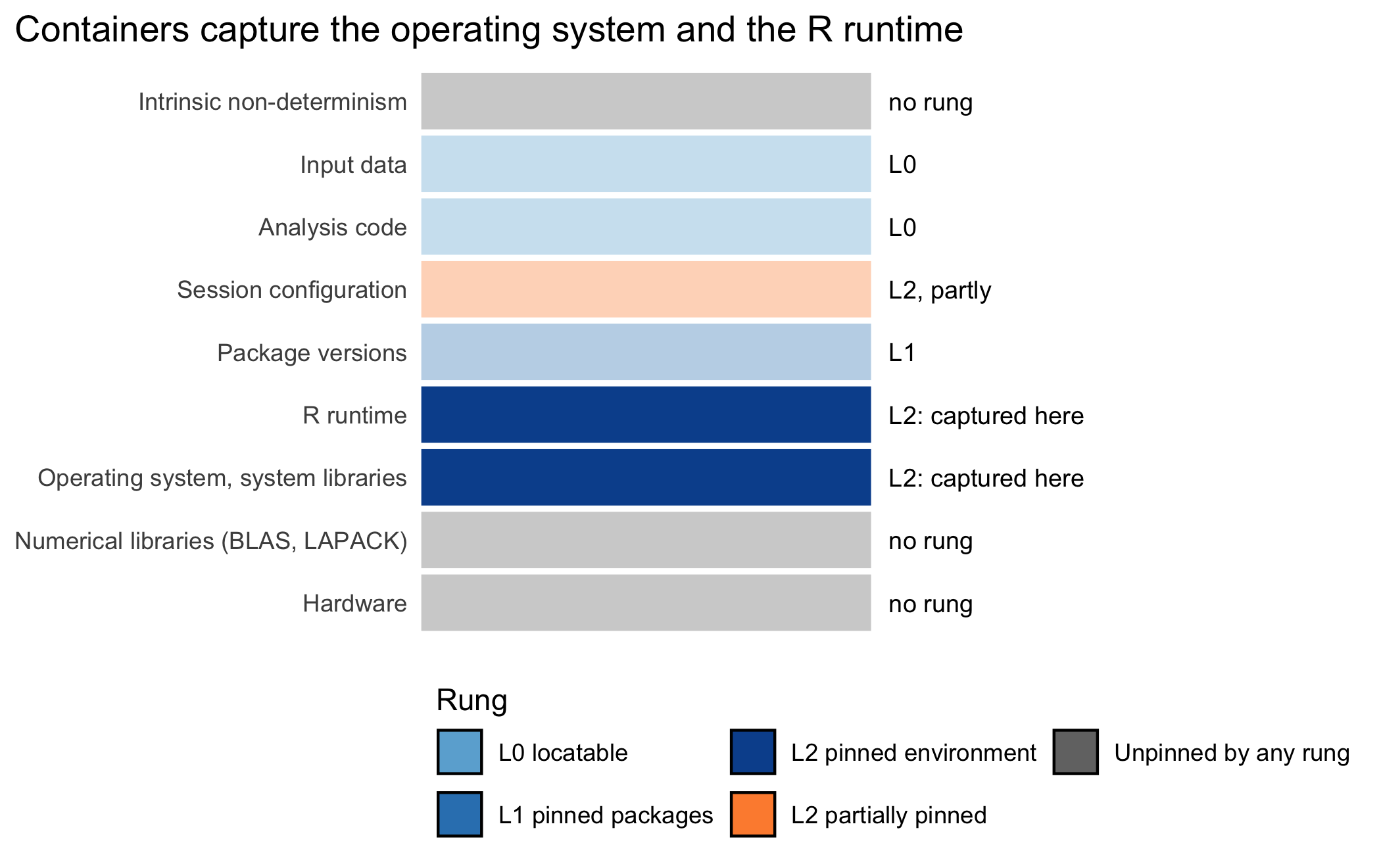
Though computational reproducibility seems more straight forward than replicating physical experiments, the complex and rapidly changing nature of computer environments makes being able to reproduce and extend such work a serious challenge.
Carl Boettiger, An Introduction to Docker for Reproducible Research (2015)
By the end of this chapter you will be able to write a Dockerfile that reaches L2, pinned environment, rather than one that merely looks reproducible. Its base will be named by an immutable digest, and its installer will fetch from a dated snapshot of the package repository. Its locale, time zone, and thread count will be declared in the recipe instead of inherited from whichever machine happens to run it.
This chapter captures, for the first time in the book, the two layers beneath the packages. These are the operating system with its system libraries, and the R runtime itself. Figure 7.1 marks both as captured on the shared determinant stack of Chapter 3. The chapter captures nothing above those two layers. A container that pins the operating system and the R version still restores whatever the lockfile says about packages, which is the layer Chapter 6 already captures.
plot_determinant_stack(
captures = c('Operating system, system libraries', 'R runtime'),
title = 'Containers capture the operating system and the R runtime')Consider an epidemiologist who has done everything the previous chapter asked. Her cohort analysis is under version control, and every R package it uses is fixed to an exact version in a lockfile. She has reached L1, pinned packages, and she is entitled to some confidence. She sends the project to a collaborator, who runs renv::restore() and watches it fail. One of her packages links against the geospatial library GDAL, which is present on her machine and absent on his, and the package will not install without it. On a third machine the restore succeeds, but the analysis returns a subtly different figure, because that machine runs an older release of R in which a numerical default differs. The lockfile did its job perfectly.
The lockfile pins the R packages and nothing beneath them. It says nothing about the operating system, the system libraries such as GDAL or libxml2 that many packages link against, or the R interpreter itself. As Ushey observed in documenting renv, the tool records the packages an analysis used, not the platform it ran on (Ushey & Wickham, 2026). A lockfile restored under a different R version, or on an operating system missing a required system library, may fail to install or, more insidiously, may install and behave differently. This is the gap the present chapter closes. Its subject is the container, the technology that fixes the operating system, the system libraries, and the runtime, and so carries an analysis from L1 to L2, pinned environment.
We shall build the container from first principles, assuming no prior contact with it. The reason is that the health scientist who most needs reproducibility is rarely the one with a systems-administration background. We begin with what a container is, and proceed to the Rocker project that supplies R-specific containers. We then take up the two refinements that make a container itself reproducible rather than merely convenient, and the complication that multi-architecture images bring to a recent Mac. The environment variables that govern determinism follow. We close with the profiles and the team model, then work one project from L1 to L2 and check this book’s own compendium.
A container is a tool, and like every tool in this book it automates the mechanical part of the work and leaves the judgment to the analyst. Three decisions belong to the analyst and to no script.
The choice of base environment must match the archetype, not the maximum. A container can carry anything, and it is tempting to reach for the largest base image that surely contains whatever one might need. That instinct is wrong. A manuscript archetype needs a base carrying a LaTeX toolchain; an R-package archetype needs only R and the check tools; a simulation archetype may want more cores than it wants software. Provisioning far above the need inflates the image, slows every rebuild, and obscures what the analysis actually depends on. The analyst chooses the smallest base that carries the real requirement.
How far to pin decides whether the reproducibility claim is honest. Consider a container built on a mutable tag such as latest, which installs whatever the package repository serves on the day of the build. Such a container looks reproducible and is not. Two builds from the same recipe on different days produce different images. Fixing this costs a little effort now, in pinning the base by digest and the installer by date, and the analyst must decide to spend it. The chapter will argue that the effort is the difference between claiming L2 and reaching it.
The environment variables that govern determinism are the analyst’s to set. A container inherits a locale, a time zone, and a default thread count. These silently shape sorting, date arithmetic, and the last bits of a floating point sum. No tool infers what the analysis needs; the analyst declares it, in a few lines that a later reader can inspect and trust.
FROM line. Here, a Rocker image providing a fixed R version on a fixed operating system.rocker/tidyverse:4.4.0, is a human-readable pointer that may later be repointed. A digest, @sha256:..., is an immutable hash of the content it names, and the same digest always denotes the same content. For a multi-architecture image that content is an index listing one image per platform, so a digest fixes one filesystem only together with a fixed platform, here --platform linux/amd64.minimal, tidyverse, rstudio, or publishing. It selects the FROM image.The boundary of what a lockfile fixes is the whole motivation for the container. A lockfile records, for every R package the analysis code uses, the exact version and the repository it came from, and renv::restore() reinstalls that precise set (Ushey & Wickham, 2026). That is the L0-to-L1 transition, and it is genuine progress. Beneath the packages, however, sits a stack of determinants the lockfile never touches.
Three of these matter most. The first is the operating system, which supplies the C library and the conventions for locale and sorting against which every package was compiled. The second is the layer of system libraries, the compiled non-R software that packages link against: GDAL for spatial data, libxml2 for XML parsing, the numerical libraries that implement linear algebra. A package that needs GDAL will not install on a machine that lacks it, and the lockfile cannot supply it, because GDAL is not an R package. The third is the R interpreter itself. A lockfile pins the packages but not the R version: its R block records the version, and nothing in it can install that version. As we saw in the introduction, a change between R releases can alter a result silently: the sample() default that changed in R 3.6.0, the stringsAsFactors default that flipped in R 4.0.0. Restore the same lockfile under a different R, and the packages match while their behavior does not.
renv is therefore necessary and, by itself, insufficient. It closes the package layer cleanly and leaves the three layers beneath it exposed. Fixing those takes a tool that packages the whole computer the packages ran on, which is the container.
The idea of the container is straightforward, and it is easiest to grasp through the distinction between an image and a container. The two are as different as a recipe from a meal, or a class from an object.
An image is a frozen filesystem plus metadata. It is, quite literally, a snapshot of a fully installed computer: it holds an operating system, the system libraries, a particular R, a particular set of R packages, and the configuration that ties them together. All of this is captured as a single read-only artifact. The image does not run. It is inert, like a disk image or a virtual-machine template, waiting to be started.
A container is what one gets by starting an image. It is a running instance. The frozen filesystem is made live, and a process begins inside it. That process sees exactly the operating system and libraries the image froze, regardless of what the host machine outside the container happens to have. One image can start many containers, each an independent running copy that begins from the same frozen state. When a container exits, any change it made to its own filesystem is ordinarily discarded, and the next container starts again from the pristine image. The image is the durable, shippable thing; the container is the ephemeral, running thing.
Images are built in layers, which explains both the speed of the tool and the way we shall pin it. An image is built from a recipe, the Dockerfile, whose instructions execute in order, and each instruction adds one layer to a stack. A layer that installs the operating system sits at the bottom; a layer that installs R sits on top of it; a layer that installs packages sits on top of that. Because layers are content-addressed and cached, an unchanged lower layer is never rebuilt, and two images that share a base share its layers on disk. This is why building a second project from the same base is fast, and why, later, we shall be careful about which layer a given change invalidates.
The property that earns the container its place in this book is often summarized as ‘it runs the same everywhere it runs’. The claim is precise, and the repetition of ‘runs’ is deliberate. Wherever a container runtime is present, the same image starts a container with the same operating system, the same system libraries, and the same R. A result computed inside it therefore does not depend on the host. The qualification is that the container must actually run: the guarantee holds across every machine with a compatible runtime, and it is silent about machines that have none. This is a real boundary, and we return to it, and to the runtimes that widen it, in Chapter 8. For present purposes the container gives us what the lockfile could not: a fixed operating system, fixed system libraries, and a fixed R, traveling together as one artifact.
A Dockerfile could, in principle, begin from a bare operating system and install R by hand. Almost no one does, because the R community maintains a set of ready base images that have become the standard starting point. This is the Rocker project. Boettiger introduced Docker to the reproducible-research audience and argued that a container is the natural unit for shipping a computational environment (Boettiger, 2015). Boettiger and Eddelbuettel then built and documented the Rocker images themselves, a family of R-specific base images maintained in step with R releases (Boettiger & Eddelbuettel, 2017). The fuller account, including the tooling that has grown around the images, is given by Nüst and colleagues in their survey of what they call the Rockerverse (Nüst, Eddelbuettel, et al., 2020).
The practical value of Rocker is that it supplies, for each R version, a tested base image with R already installed on a known operating system. The analyst’s recipe can then build on that shared foundation. The images form a small hierarchy. At the bottom sits rocker/r-ver, R on Ubuntu and little else. Above it, rocker/rstudio adds the RStudio Server development environment. rocker/tidyverse builds on rocker/rstudio, adding the tidyverse packages and the pandoc document converter, so it carries RStudio Server as well and is the larger of the two. And rocker/verse adds a LaTeX toolchain for rendering manuscripts to PDF. Each higher image is built on the one below, so they share layers, and each fixes a larger environment than the last. We shall meet these again as the profiles.
A container is reproducible only if the recipe that builds it is, and the naive recipe is not. Two refinements separate a container that merely runs today from one that will rebuild to the same image next year. Nüst and colleagues, in their ten simple rules for writing Dockerfiles for reproducible data science (Nüst, Sochat, et al., 2020), argue for pinning software versions explicitly. They also argue for naming version-specific image tags rather than :latest. At the same time they caution that even a version-specific tag is not a guarantee against change, since the maintainer can still rebuild and repoint it. (Inspected: the published rules recommend version tags, not cryptographic digests, and do not discuss dated package-repository snapshots.) This chapter takes that caution one step further than their rules do, with two refinements that do the most work here:
The first refinement pins the base image by its digest rather than by a tag. A tag such as rocker/tidyverse:4.4.0 is a mutable pointer. It names an image today, but the maintainers may rebuild and repoint it tomorrow, for instance to patch a security flaw in the operating system. A recipe that named the tag would then build on different bytes, without any change to the recipe itself. A digest is an immutable hash of the exact image content, so that
FROM rocker/tidyverse@sha256:1c2f...e8a9names not ‘whatever 4.4.0 points to’ but one specific piece of content that the digest will denote forever. For the Rocker images this chapter uses, that content is an image index, a short table with one image per CPU architecture, from which a build receives the entry matching the platform it requests. A digest therefore fixes one filesystem only together with a fixed platform, so this book pins the index digest and always builds with --platform linux/amd64. The section on Apple Silicon below explains why that platform, and the alternative of pinning the platform-specific digest.
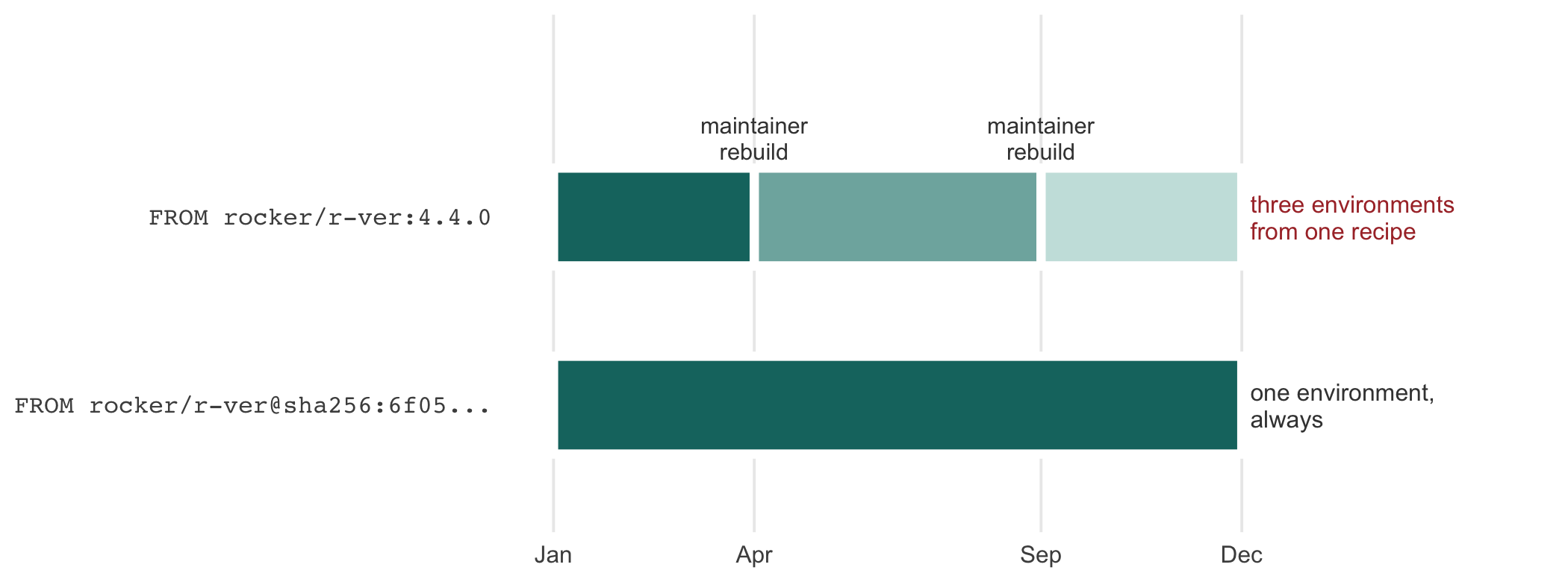
Figure 7.2 follows one unchanged recipe across a year to show what the difference costs. The recipe is not edited at any point in either row; the only thing that varies is whether its FROM line names the tag or the digest. (The digest strings shown here and in the figure, such as sha256:1c2f...e8a9 and sha256:6f05..., are truncated for display and illustrative only. A digest copied for actual use must be the full 64-character hash, such as the one the showcase Dockerfile below carries.) Nothing in the upper row is an error or a misconfiguration on the maintainer’s part. Repointing a tag to patch a security flaw is the correct thing for them to do, which is exactly why a tag cannot carry a reproducibility claim.
library(ggplot2)
library(tibble)

spans <- tibble(
  row = c('FROM rocker/r-ver:4.4.0',
          'FROM rocker/r-ver:4.4.0',
          'FROM rocker/r-ver:4.4.0',
          'FROM rocker/r-ver@sha256:6f05...'),
  xmin = c(0, 3.5, 8.5, 0),
  xmax = c(3.5, 8.5, 12, 12),
  build = c('build 1', 'build 2', 'build 3', 'build 1')
)
spans$row <- factor(spans$row,
                    levels = c('FROM rocker/r-ver@sha256:6f05...',
                               'FROM rocker/r-ver:4.4.0'))

ggplot(spans) +
  geom_rect(aes(xmin = xmin, xmax = xmax,
                ymin = as.numeric(row) - 0.26,
                ymax = as.numeric(row) + 0.26,
                fill = build),
            color = 'white', linewidth = 1.4) +
  scale_fill_manual(values = c('build 1' = '#14746f',
                               'build 2' = '#7fb1ad',
                               'build 3' = '#c9e2df'),
                    guide = 'none') +
  scale_y_continuous(breaks = 1:2,
                     labels = levels(spans$row),
                     limits = c(0.45, 2.95)) +
  scale_x_continuous(breaks = c(0, 3.5, 8.5, 12),
                     labels = c('Jan', 'Apr', 'Sep', 'Dec')) +
  annotate('text', x = 3.5, y = 2.42, label = 'maintainer\nrebuild',
           size = 2.6, lineheight = 0.95, color = 'grey25') +
  annotate('text', x = 8.5, y = 2.42, label = 'maintainer\nrebuild',
           size = 2.6, lineheight = 0.95, color = 'grey25') +
  annotate('text', x = 12.15, y = 2, hjust = 0,
           label = 'three environments\nfrom one recipe',
           size = 2.7, lineheight = 0.95, color = '#a33') +
  annotate('text', x = 12.15, y = 1, hjust = 0,
           label = 'one environment,\nalways',
           size = 2.7, lineheight = 0.95, color = 'grey25') +
  coord_cartesian(xlim = c(0, 16.6), clip = 'off') +
  labs(x = NULL, y = NULL) +
  theme_minimal(base_size = 9.5) +
  theme(
    panel.grid.major.y = element_blank(),
    panel.grid.minor = element_blank(),
    axis.text.y = element_text(family = 'mono', size = 8, hjust = 1)
  )
The second refinement concerns what happens inside the image when it installs packages. An installer pointed at a live package repository resolves ‘the current version’ to whatever is current on the day of the build. An image built in March and an image built in June from the same recipe therefore carry different packages. The remedy is to point the in-image installer at a dated snapshot of the repository, a frozen view of the repository as it stood on a chosen day. With the snapshot fixed, a request for ‘the current version’ resolves to the same version on every build. In sum, the digest fixes the ground the image is built on. The lockfile, restored inside the image, fixes which package versions are installed onto it. The dated snapshot fixes where those packages are fetched from, and what any install that names no version resolves to.
A small Dockerfile with both refinements in place, and with the environment variables of the next section, follows. It is shown as static text, but we tested it. On 2026-10-11 we built it with docker build --platform linux/amd64 against a lockfile written by renv 1.2.3 that pins one package, jsonlite 2.0.0. The lockfile’s recorded R version was set to 4.4.0 to match the image, and the built image reported jsonlite 2.0.0 and renv 1.2.3. The digest is the one the rocker/r-ver:4.4.0 tag resolved to on that date. A reader adapting the recipe should look the digest up afresh, as Exercise 1 shows, rather than copy one from a book.
# rocker/r-ver:4.4.0 is built on Ubuntu 22.04 (jammy), so the
# binary snapshot below must name jammy. Digest as of 2026-10-11.
FROM rocker/r-ver:4.4.0@sha256:73adabf378930f8744f56bac1fe5e99870532eb4ced1a15075991bac909d21f3

ARG PPM_SNAPSHOT=https://packagemanager.posit.co/cran/__linux__/jammy/2026-06-27
ARG RENV_VERSION=1.2.3

LABEL org.opencontainers.image.base.name="docker.io/rocker/r-ver:4.4.0" \
      org.opencontainers.image.base.digest="sha256:73adabf378930f8744f56bac1fe5e99870532eb4ced1a15075991bac909d21f3" \
      cran.snapshot="2026-06-27"

ENV LANG=en_US.UTF-8 \
    LC_ALL=en_US.UTF-8 \
    TZ=UTC \
    OMP_NUM_THREADS=1 \
    OPENBLAS_NUM_THREADS=1 \
    RENV_CONFIG_REPOS_OVERRIDE=${PPM_SNAPSHOT}

# Later lines win, so this replaces Rocker's own snapshot date.
RUN echo "options(repos = c(CRAN = '${PPM_SNAPSHOT}'))" \
      >> /usr/local/lib/R/etc/Rprofile.site

WORKDIR /project
COPY renv.lock renv.lock

RUN Rscript -e "install.packages('renv')" \
 && Rscript -e "stopifnot(packageVersion('renv') == '${RENV_VERSION}')"

RUN Rscript -e "renv::restore(library = .libPaths()[1], prompt = FALSE)"
Several lines guard against failures that are easy to miss.
rocker/r-ver:4.4.0 FROM ubuntu:jammy, that is, Ubuntu 22.04, as its published Dockerfile for the release shows. Posit Package Manager serves Linux binaries compiled for a named distribution release, so the snapshot URL must say jammy. A URL naming a newer release, such as noble (24.04), would install binaries built against a different set of system libraries.WORKDIR gives the project a directory of its own. Without it the build runs in /, the root of the file system, which renv would then treat as the project. That directory contains the home directory, and renv::init() refuses to initialize a project in that position. A dedicated directory avoids the problem and keeps renv’s files out of the root.renv is installed at the version the lockfile records. The lockfile names the renv that wrote it, here 1.2.3. On the snapshot date that was the current release, so a plain install.packages('renv') fetches it, and the stopifnot() line turns any mismatch into a failed build. Passing --build-arg RENV_VERSION=1.2.2 makes the build stop at that line with packageVersion("renv") == "1.2.2" is not TRUE, which is how we confirmed the check can fail.RENV_CONFIG_REPOS_OVERRIDE says so. By default renv::restore() ignores the session’s repository option and downloads from the repositories recorded in the lockfile. We confirmed both directions by building variants. With the override removed and a different date in Rprofile.site, the restore still fetched from the lockfile’s date. With the override set and a different date written into the lockfile, the restore fetched from the image’s snapshot, as jammy binaries.library = .libPaths()[1] installs the restored packages into the image’s site library, so every R session in the container sees them without activating a project.The build prints a warning from renv that curl does not appear to be installed and that downloads will fail. In this image the warning is harmless: the downloads go through R’s built-in libcurl support, as the completed restore shows.
The snapshot does not choose the versions of the packages in the lockfile; the lockfile does, and a recorded version older than the one current on the snapshot date is sought in the repository’s archive. What the snapshot fixes is the source of every download, the binary build that matches the image’s Ubuntu release, and the version of anything installed without a lockfile entry. Here that means renv itself, and any later install.packages() call made inside the running container. Rocker’s own image already points R at a dated snapshot, fixed for each R version at the last day that version was current (2024-06-13 for 4.4.0), which is why the echo line appends rather than replaces: the later setting wins.
The container and the lockfile divide the labor. The FROM line fixes the operating system, the system libraries, and the R; the snapshot fixes where packages come from; the COPY renv.lock and renv::restore() fix the exact package versions inside that environment. Neither the container nor the lockfile alone is enough. A container without a lockfile fixes the environment but not which package versions live in it; a lockfile without a container fixes the packages but not the platform. An L2 analysis uses both. The honest reading of an image, then, is that it reaches L2 only when the base is pinned by digest, the snapshot is dated, and a lockfile is restored inside it.
When this chapter’s own practice names a digest, a dated snapshot, and a restored lockfile together, as it does in the Dockerfile above, it reaches L2 for the two layers a lockfile cannot reach. These are the operating system and system libraries, and the R runtime. It leaves L3, verification against a recorded baseline, entirely to Chapter 12.
A pinned recipe must also run where the reviewer works. In the R Consortium’s Pilot 4, a Shiny application submitted to the FDA with a Dockerfile, the agency’s statistical reviewers installed WSL and Docker Desktop on Windows. They noted that agency-issued laptops may not permit WSL or an unlicensed Docker Desktop, and found that the R version still decided whether the packages restored (U.S. Food and Drug Administration, Center for Drug Evaluation and Research, Office of Biostatistics, 2026). Their review, dated May 2026, concluded that containers so far may not give the robustness a regulatory submission needs (R Consortium, 2026; U.S. Food and Drug Administration, Center for Drug Evaluation and Research, Office of Biostatistics, 2026); the setup appendix covers such locked-down machines.
The digest pinned in the previous section carries one complication, which matters to anyone who builds on a recent Mac. A single image tag, such as rocker/r-ver:4.4.0, need not name one fixed set of bytes. Docker images can be published as a manifest list, also called an image index. That is, one tag, or even one digest, points not directly at a filesystem but at a small table of entries. Each entry names a different CPU architecture built from the same recipe. When a client pulls the tag, the runtime inspects its own architecture and silently selects the matching entry. An amd64 host receives the amd64 build, an arm64 host receives the arm64 build, and the person who wrote FROM rocker/r-ver:4.4.0 never chose between them. This is what a multi-architecture image is: one name that resolves to different, independently built images depending on who is asking.
Not every Rocker image offers that choice. Rather than trust a secondary source, we checked directly, with docker buildx imagetools inspect. The digest on the showcase Dockerfile’s FROM line names an index with a linux/amd64 and a linux/arm64 image (verified). But rocker/tidyverse:4.4.0 and rocker/verse:4.4.0, the bases of the tidyverse and publishing profiles, publish linux/amd64 only (verified); neither carries an arm64 entry. An Apple Silicon Mac is an arm64 host. A plain docker build of the showcase Dockerfile on such a Mac therefore succeeds without any flag, natively, on the arm64 image (verified), while a recipe built on rocker/tidyverse or rocker/verse has no matching entry to select and needs --platform linux/amd64 to build at all.
The native build is the one to be wary of, because it succeeds quickly and yields a different image from the one a labmate on an Intel laptop, a CI runner, or a cluster node builds from the same FROM line. It starts from a different base image, and in our arm64 build of the showcase the packages compiled from source where an amd64 build installs binaries. An image built natively on a Mac and pushed to a registry will also not run on an x86 cluster. The flag is what makes a Mac build the same image the cluster runs, so this book passes --platform linux/amd64 to every build, whatever the base.
The --platform linux/amd64 flag requests the amd64 entry explicitly, overriding the host-architecture default. On an Apple Silicon host, Docker Desktop satisfies that request through QEMU, a CPU emulator that translates each amd64 instruction into the sequence of native arm64 instructions that has the same effect. Docker’s own documentation on multi-platform builds is direct about the cost: emulation with QEMU ‘can be much slower than native builds’, especially for compute-heavy work (Docker Inc., 2024). Every package compile and every renv::restore() inside the image pays this tax; a build that takes two minutes natively can take much longer under emulation. This is a real cost, worth planning a build around, but it is a cost in time, not in correctness. A QEMU-translated amd64 instruction still computes the amd64 result, so a container built this way runs the same program, only more slowly.
Emulation is not where a numerical risk would come from; the native build is. A native arm64 build of the showcase Dockerfile is not guaranteed to match an emulated amd64 build bit for bit. The reason is that a different architecture’s base image can, in principle, link a different BLAS, enable different vector instructions, or carry a different compiler default. Any of these can shift a floating-point result in its last few bits. None of that is new: it is the same category of hidden determinant, beneath the package layer, that the next section takes up for thread counts. The digest alone does not settle the question, because one index digest names both images. A digest together with a fixed platform does. The platform decides which entry of the index a build receives, and the digest decides that the entry is the same every time it asks. Pin both, or pin the digest of the platform-specific manifest, which names one filesystem by itself. This book pins the index digest and always passes --platform linux/amd64, the architecture of GitHub’s standard CI runners and of most HPC clusters.
Are a fixed operating system and a fixed R enough? Not quite, because the same R on the same operating system can behave differently according to a handful of environment variables that the container inherits. Three of these deserve concrete illustration, because the failures they cause are silent and the fixes are one line each.
The first is the locale, carried in LANG and LC_ALL, which governs, among other things, how text is sorted and how dates and numbers are formatted for display. R’s own numeric parsing is not one of the things it governs. LC_NUMERIC is pinned to "C" inside R regardless of what LANG or LC_ALL say, so as.numeric('1,5') returns NA with a coercion warning under any locale the host or container sets. (We verified this by calling Sys.setlocale('LC_ALL', 'fr_FR.UTF-8') and confirming that Sys.getlocale('LC_NUMERIC') still reports 'C' and as.numeric('1,5') is still NA.) The risk is not that R silently reparses a number under a different convention; it is that data arriving from outside R already carries a convention baked in. A locale that uses a comma as the decimal mark, common across much of Europe, writes the number one and a half as 1,5 in a spreadsheet or CSV export. An ingest step that assumes a period decimal mark will misread it without erroring; an example is a hand-written regex that strips what it takes to be thousands separators. To make the failure concrete, consider the same numeric vector written under each convention by an external tool such as a spreadsheet application. The table below shows what a naive period-assuming cleaning step reads back from the comma-convention strings.
library(tibble)

x <- c(1.5, 2200.75, 0.333)

period <- formatC(x, format = 'f', digits = 3, big.mark = ',')

comma <- gsub(',', '#', period)
comma <- gsub('\\.', ',', comma)
comma <- gsub('#', '.', comma)

read_back <- as.numeric(gsub(',', '', comma))

decimal_demo <- tibble(
  original      = x,
  period_locale = period,
  comma_locale  = comma,
  parsed_value  = read_back
)

knitr::kable(decimal_demo)| original | period_locale | comma_locale | parsed_value |
|---|---|---|---|
| 1.500 | 1.500 | 1,500 | 1500.00000 |
| 2200.750 | 2,200.750 | 2.200,750 | 2.20075 |
| 0.333 | 0.333 | 0,333 | 333.00000 |
The parsed values are wildly wrong, and nothing warns the analyst. The number 1.5 returns as 1500, the number 2200.75 as roughly 2.2, and the number 0.333 as 333, because the period-assuming cleaning step treats the European comma as noise and strips it. This is a failure of the ingest code, not of R’s parser. Even so, pinning LANG and LC_ALL in the image still matters for the parts of R that genuinely do depend on locale: collation and formatted output. Sorting the strings 'cote', 'côte', 'coté', 'coter' with sort() returns a different order under LC_ALL=C than under LC_ALL=fr_FR.UTF-8 (verified). Likewise, format(Sys.Date(), '%B') prints an English month name under one and a French month name under the other (verified). A report that sorts a table of names, or prints a month in running text, will read differently on two machines that disagree about locale even though every number in it was parsed identically. Fixing LANG and LC_ALL in the image removes that variability, which is why the Dockerfile above sets both to en_US.UTF-8.
The second is the time zone, carried in TZ. Date and time arithmetic depends on it, and an analysis that buckets events by calendar day will assign a late-evening event to different days in different time zones. Fixing TZ=UTC in the image makes the calculation independent of where the container runs.
The third is the thread count, carried in variables such as OMP_NUM_THREADS. Numerical libraries that implement linear algebra may split a computation across several threads. And because floating-point addition is not exactly associative, the order in which partial sums are combined can change the last bits of a result. Two runs of the same bootstrap or the same mixed model, one on four threads and one on eight, may therefore differ in the final digits. Which variable actually governs the summation order depends on the BLAS implementation the image carries: OPENBLAS_NUM_THREADS for OpenBLAS (which falls back to OMP_NUM_THREADS when it is unset), MKL_NUM_THREADS for the Intel MKL, and OMP_NUM_THREADS for the OpenMP-parallel sections. The rocker/r-ver images link R against the multithreaded OpenBLAS, not the single-threaded reference BLAS; in the image built above, sessionInfo() reports openblas-pthread/libblas.so.3. That is why the Dockerfile sets OPENBLAS_NUM_THREADS=1 alongside OMP_NUM_THREADS=1. OpenBLAS reads its own variable first, so a stray OPENBLAS_NUM_THREADS would override OMP_NUM_THREADS=1. Setting both to one together removes thread count as a source of variation in the order of summation. The image determines which BLAS is installed, but no rung of the ladder guarantees this layer. An L2 image run on a different CPU, or with these variables overridden at run time, can still move the last digits. The cost is a little speed, traded for run-to-run stability on the same image. Whether that trade is worth making is the analyst’s judgment, and a container lets that judgment be recorded and enforced instead of left to whatever the host defaults to.
The choice of base image is, in practice, a choice from a short menu, and the framework this book uses names the entries profiles. A profile is a base-image bundle, and selecting one sets the FROM line and little else. Four profiles cover most needs.
The minimal profile builds on rocker/r-ver: R on Ubuntu with the development essentials and nothing more. It is the smallest base, and the right one when the analysis pulls in whatever it needs through the lockfile. The tidyverse profile builds on rocker/tidyverse, adding the tidyverse packages and pandoc, and is the natural default for data analysis. The rstudio profile builds on rocker/rstudio, adding the RStudio Server environment for those who prefer to work in the browser-based IDE. The publishing profile builds on rocker/verse, which carries a LaTeX toolchain, and is the base to choose when the deliverable is a rendered PDF manuscript.
The design intent is that the profiles differ in as few lines as possible. Moving a project from one profile to another changes the FROM line and, at most, a single system-installation line. The reproducibility-relevant configuration stays constant: the locale and time-zone variables, the dated snapshot, and the lockfile restore. The profile decides what the base carries, and the lockfile decides what is installed on top.
The archetypes of Chapter 5 map onto the profiles naturally, and the mapping is the concrete form of the first analyst judgment above. The same machinery, a digest-pinned base, a dated snapshot, a restored lockfile, and the determinism variables, serves every archetype; only the base changes.
rocker/verse carries and the lighter bases do not.OMP_NUM_THREADS and OPENBLAS_NUM_THREADS) and the seeding discipline of Chapter 5 deserve particular care.A container fixes an environment for one analyst. A team needs one shared environment, and this introduces a wrinkle we shall only sketch here and develop fully in Chapter 13. Building an image from a Rocker base and a full package set takes many minutes. It would be wasteful for every member of a lab, and every one of a lab’s projects, to rebuild the same base from scratch.
The remedy is a two-layer model. A team lead builds a comprehensive team image once, carrying the lab’s preferred packages, and pushes it to a shared registry. Each project then builds a thin second layer on top of that team image, rather than on the raw Rocker base. The first layer, the team image, is built once and reused everywhere; the second layer, the per-project image, adds only what the project needs and builds in seconds, where the full image takes minutes. Because the team image is itself pinned by digest, recorded in a committed file, and built and pulled for one platform (--platform linux/amd64), every member runs the same filesystem. ‘Works on my machine’ therefore cannot arise: there is, in the relevant sense, only one machine. A member who drops the flag on an Apple Silicon Mac falls outside that guarantee. The mechanics of building, pushing, digest-recording, and updating the team image are the business of Chapter 13.
We now follow a concrete case through, in the manner of the framework this book uses, which generates the Dockerfile so that the analyst does not write one by hand. A biostatistician is analyzing a registry cohort. The deliverable is a set of tables and figures, not a typeset manuscript, so the appropriate archetype is data analysis and the appropriate profile is minimal. That profile carries R and the essentials, with the analysis stack drawn from the lockfile. She scaffolds the project and builds the image. The shell session, shown as static text and never executed here, is short.
$ mkdir cohort-study && cd cohort-study
$ zzc minimal
$ make docker-build
$ make r
The zzc minimal step generates the project, including a Dockerfile pinned to a digest and a dated snapshot; make docker-build builds the image; and make r starts a container and drops her into an R session inside it. The generated Dockerfile is, in essence, the one shown earlier. It carries a digest-pinned FROM rocker/r-ver, the locale and time-zone and thread variables, and the dated snapshot wired into the repository options. It ends with a renv::restore() that installs the locked packages inside the fixed environment. The image records its own provenance in labels, the base image, its digest, and the snapshot date, so a later reader can see exactly what was pinned without leaving the image.
Now suppose a reviewer asks for a typeset manuscript with the analysis embedded. The archetype has shifted, and so should the profile. She regenerates against the publishing base:
$ zzc publishing
$ make docker-build
The FROM line now names rocker/verse, the LaTeX toolchain comes with it, and the manuscript renders to PDF inside the container. Almost nothing else in the recipe changed: the locale and thread variables, the dated snapshot, and the lockfile restore are identical. The same reproducibility machinery served both archetypes, and the move between them was a single changed line.
What has she gained, in the vocabulary of the ladder? Before the container, at L1, her collaborator’s restore could fail for a missing system library, or succeed and compute a different number under a different R. After it, at L2, the operating system, the system libraries, and the R are fixed and travel with the analysis, and the locale and time-zone and thread variables are declared rather than inherited. What she has not yet gained is verification, L3. An image that builds and a report that renders are not the same as a report whose numbers have been regenerated and shown to match a recorded baseline. That is the subject of Chapter 12.
The running cohort compendium of this book is, itself, a small research compendium: a cohort_raw.csv, a clean_cohort(), and a model fit on top. Whether it has reached L2 yet can be checked directly.
files_needed <- c('Dockerfile', 'renv.lock')
present <- file.exists(file.path('../..', files_needed))
names(present) <- files_needed
present
#> Dockerfile  renv.lock
#>      FALSE       TRUE
Only renv.lock exists at the compendium’s root, so by this chapter’s standard the compendium is at L1. Reaching L2 needs nothing new. It needs only a Dockerfile that follows the showcase recipe built and verified earlier in this chapter, adapted to what the compendium’s own renv.lock records:
FROM line naming a Rocker base appropriate to the compendium’s archetype, data analysis, and carrying the R the lockfile records, 4.6.1 here: so rocker/r-ver:4.6.1, pinned by its index digest and built with --platform linux/amd64, rather than the showcase’s rocker/r-ver:4.4.0. The two versions must match, because a lockfile restored under a different R is the mismatch this chapter opened with;ARG, naming the Ubuntu release the chosen base actually runs, wired into RENV_CONFIG_REPOS_OVERRIDE as the showcase Dockerfile does. The release changes with the R version: rocker/r-ver:4.4.0 runs Ubuntu 22.04 (jammy), while rocker/r-ver:4.6.1 runs Ubuntu 24.04 (noble), as the CRAN setting in its image configuration shows;LANG/LC_ALL set to a fixed locale, TZ=UTC, and OMP_NUM_THREADS/OPENBLAS_NUM_THREADS set to a deliberate value, since the compendium’s bootstrap_ci() refits the model many times, and a multithreaded BLAS could move the last digits of the interval it reports;WORKDIR, a COPY renv.lock renv.lock, and the same two-step renv install and renv::restore() pattern, so the packages the compendium’s scripts load are restored inside the pinned environment.None of this is built here, because building and verifying an image is slow and the showcase Dockerfile earlier in this chapter already did that verification once. What the check above adds is specific to the compendium: no Dockerfile is in place yet, and the gap is these four concrete items, not a vague ‘needs a Dockerfile’.
A language model is a capable assistant for container work, and a Dockerfile it writes can look complete while lacking the pins this chapter requires. The analyst who delegates must verify, and the following three exchanges show what to watch for.
One rule comes first (habit 3). Never paste or upload protected health information, identifiable records, or data held under a data use agreement, nor outputs derived from them, into a model or a coding agent unless three conditions all hold. The institution has approved that endpoint for that class of data. The IRB protocol and the consent permit the processing. The data use agreement, or the provider’s terms, permits it. If any of the three is unclear, the answer is no.
The third condition is the one most often missed. Institutional approval of a tool does not override the terms under which a data provider released the data. NIH, for example, treats sharing controlled-access data through prompts with public generative AI tools, which it glosses as third-party tools, as a breach of the data use certification. It treats a model trained on such data as a data derivative, to be shared only with other approved users and not kept after the project closes (National Institutes of Health, 2025).
Describe the structure instead: the column names and types, or a small synthetic example generated from the data dictionary, never edited from real rows. A coding agent sees whatever files are in its working tree, so run it in a checkout or container where the real data is not mounted.
An agent also acts, so confine it to a branch and keep merges, pushes, and deposits for yourself (Section 2.10.1).
In container work, what an agent can see includes every host directory bind-mounted into a container it runs in, so a mount of the data directory exposes the data as surely as a copy in the working tree would.
Prompt. ‘Write me a Dockerfile for my R analysis.’
Watch for. Check whether the answer opens with FROM rocker/tidyverse:latest or a bare version tag, installs packages from the live repository, or sets none of the determinism variables. Every one of these is a reproducibility defect: the mutable tag, the undated installer, the absent locale and time zone. Such a recipe runs today and is not L2.
Verification. Confirm that the FROM line carries an @sha256: digest, not merely a tag. Confirm also that the in-image installer points at a dated snapshot, with a distribution codename that matches the base image’s Ubuntu release, and that renv::restore() is told to use it. Finally, confirm that LANG, LC_ALL, and TZ are set. Then build the image twice and confirm the two builds carry the same content, comparing the installed operating system and the R and package versions. This can be done, for instance, through renv::status() and the apt and R package version lists. Do not compare image digests, which differ across rebuilds even for a correctly pinned recipe because per-layer timestamps vary. If the content differs, the recipe is not pinned, whatever the model asserted. If an agent ran the two builds, read the two version lists yourself; its report that they match is not the comparison (Section 2.10.1).
A better prompt. ‘Write a Dockerfile for an R <version> analysis restored from the attached renv.lock. Pin the base image by digest; point the installer at a dated Package Manager snapshot for <codename>; set LANG, LC_ALL, and TZ; install nothing at run time. List the commands I should run to confirm that two builds install identical versions.’ The slots are filled from the lockfile and the base image’s Ubuntu release, as in ‘The cohort, continued’ above.
Prompt. ‘My container gives different numbers than my laptop. Why?’
Watch for. Check whether the answer reaches first for the code, suggesting a bug in the analysis, and overlooks the environment. The environment is the more probable cause, because the container was supposed to fix it and may have fixed it incompletely. Typical gaps are a missing locale variable, a different thread count, or an unpinned package version inside a pinned environment.
Verification. Compare the environment inside the container with the one outside it: inspect LANG, LC_ALL, TZ, and the thread-count variables in both, and compare the installed package versions against the lockfile. Do not accept a diagnosis of the code until the environment has been ruled out, because a difference the container failed to pin is the more likely explanation.
Prompt. ‘Which Rocker base should I use for my project?’
Watch for. Check whether the answer recommends a large, capable base, such as the verse or a data-science image, regardless of need. Over-provisioning inflates the image and obscures the real dependencies; under-provisioning, recommending a minimal base for a project that must render a PDF, produces a build that fails only when the manuscript is rendered.
Verification. Match the base to the archetype, not to the maximum. If the deliverable is a PDF manuscript, confirm the base carries a LaTeX toolchain, for instance by checking that the LaTeX tools are present in the built image. If it is an R package, confirm that R and the check tools suffice and resist any heavier base. The judgment is the first of this chapter’s analyst contributions, and it is not one to delegate.
Take any Rocker image on your machine or on Docker Hub and find both its tag and its content digest. Explain, in two or three sentences, what could change about the image named by the tag while the image named by the digest could not, and why a reproducible recipe pins the latter.
You are handed a Dockerfile that begins FROM rocker/tidyverse:latest and installs packages with a plain install.packages() from the live repository. Identify every reason this recipe fails to reach L2, and rewrite the two instructions that most need fixing.
For each of the five archetypes, data analysis, manuscript, R package, simulation, and blog, name the profile you would choose and justify the choice in one sentence. For the two archetypes where the choice is genuinely arguable, state the trade-off on both sides.
Extend the executable table in this chapter to a date example. Construct two synthetic character vectors representing the same three dates under a month-first and a day-first convention, parse each under a single assumed convention, and show which dates are silently swapped. Relate the result to the role of TZ and locale in the image.
Explain, to a colleague who has never met the idea, why setting OMP_NUM_THREADS=1 together with OPENBLAS_NUM_THREADS=1 can change the last digits of a bootstrap confidence interval or a mixed-model estimate. State clearly what is traded away by fixing it, and name one analysis where you would judge the trade worth making.
A collaborator reports that after pulling your image and running renv::restore(), she still obtains different package versions from yours. The environment is pinned; the packages are not matching. Diagnose the most likely cause, and explain why a container alone, without the lockfile restored inside it, does not guarantee identical packages.
(Cumulative) Run raw <- load_cohort('analysis/data/raw_data/cohort_raw.csv') and cohort <- clean_cohort(raw) from the compendium’s root. Report three things: nrow(cohort); the number of distinct values of cohort$sex after cleaning; and whether file.exists('Dockerfile') evaluates to TRUE or FALSE there, as ‘The cohort, continued’ above checks. Then name the instruction in this chapter’s showcase Dockerfile that pins the thread count, and say why it sets two variables rather than one.
(Spacing) This exercise returns to the lockfile of Chapter 6, ‘Pinning Packages with renv’ (Chapter 6). Explain, in two or three sentences, what a pinned renv.lock guarantees about a result and what it does not, and name the specific gap this chapter’s container closes that the lockfile by itself cannot.
Attempt an exercise before expanding its solution. The first asks you to inspect an image on your own machine, so the values will vary; the reasoning is what the box records.
| Line or rule | What it does |
|---|---|
FROM image@sha256:... |
Pins the base by immutable content digest, not a mutable tag; for a multi-architecture index, it fixes one filesystem only together with a fixed --platform. |
ARG PPM_SNAPSHOT=.../jammy/YYYY-MM-DD |
Names a dated package-repository snapshot matching the base’s Ubuntu release. |
ENV RENV_CONFIG_REPOS_OVERRIDE=... |
Forces renv::restore() to fetch from the dated snapshot (habit 2). |
ENV LANG=... LC_ALL=... |
Fixes locale-dependent sorting and formatted output. |
ENV TZ=UTC |
Fixes day-boundary assignment for date/time arithmetic. |
ENV OMP_NUM_THREADS=1, OPENBLAS_NUM_THREADS=1
|
Removes thread count as a source of floating-point variation, trading speed for stability. |
WORKDIR /project |
Keeps renv out of the image root, where it refuses to initialize. |
COPY renv.lock renv.lock + renv::restore()
|
Restores the exact package set inside the fixed environment. |
docker build --platform linux/amd64 |
Selects the amd64 entry of an index, so a Mac builds the same image as CI and the cluster; required on Apple Silicon for amd64-only bases such as rocker/tidyverse:4.4.0. |
docker buildx imagetools inspect image:tag |
Asks the registry for the index digest a tag currently resolves to, and each platform’s manifest digest. |
docker image inspect --format '{{index .RepoDigests 0}}' image:tag |
Reports the digest a local copy was pulled under, which may be stale. |
| Rule of thumb | Compare content (renv::status(), package lists) across two builds to verify pinning; never compare digests, which differ by default even when content is identical (habit 4). |
The foundational case for containers in reproducible research is Boettiger (2015), which introduces Docker to a scientific-computing audience and is the natural first read for anyone new to the tool. The Rocker images themselves are documented by Boettiger & Eddelbuettel (2017), and the wider ecosystem of R containerization tooling is surveyed thoroughly by Nüst, Eddelbuettel, et al. (2020); both are worth consulting before building a base image of one’s own.
On making a container reproducible, the essential reference is Nüst, Sochat, et al. (2020), whose ten simple rules for writing Dockerfiles argue for version-specific image tags over :latest, explicit version pinning, and much else this chapter has drawn from. The published rules stop short of recommending a digest pin or a dated package snapshot (inspected); this chapter adds both as a stronger discipline on top of that checklist. Read the ten rules as a baseline against any Dockerfile one is asked to trust.
For the division of labor between the container and the package layer, return to Ushey & Wickham (2026) on renv, keeping in mind that its remit stops exactly where this chapter’s begins. The compendium structure into which both fit is the subject of Marwick et al. (2018), whose rrtools pairs a packaged analysis with a Dockerfile; its template has restored an renv lockfile since 2022. The alternatives to Docker as a runtime are taken up in Chapter 8. They range from the high-performance-computing runtime Apptainer (formerly Singularity) (Kurtzer et al., 2017) to the browser-based Binder (Project Jupyter et al., 2018) and the container-free Nix. The team-image model sketched here is developed in full in Chapter 13.