plot_determinant_stack(
  captures = c('Operating system, system libraries', 'R runtime'),
  title = 'Reaching the same pinned-environment rung by a different route')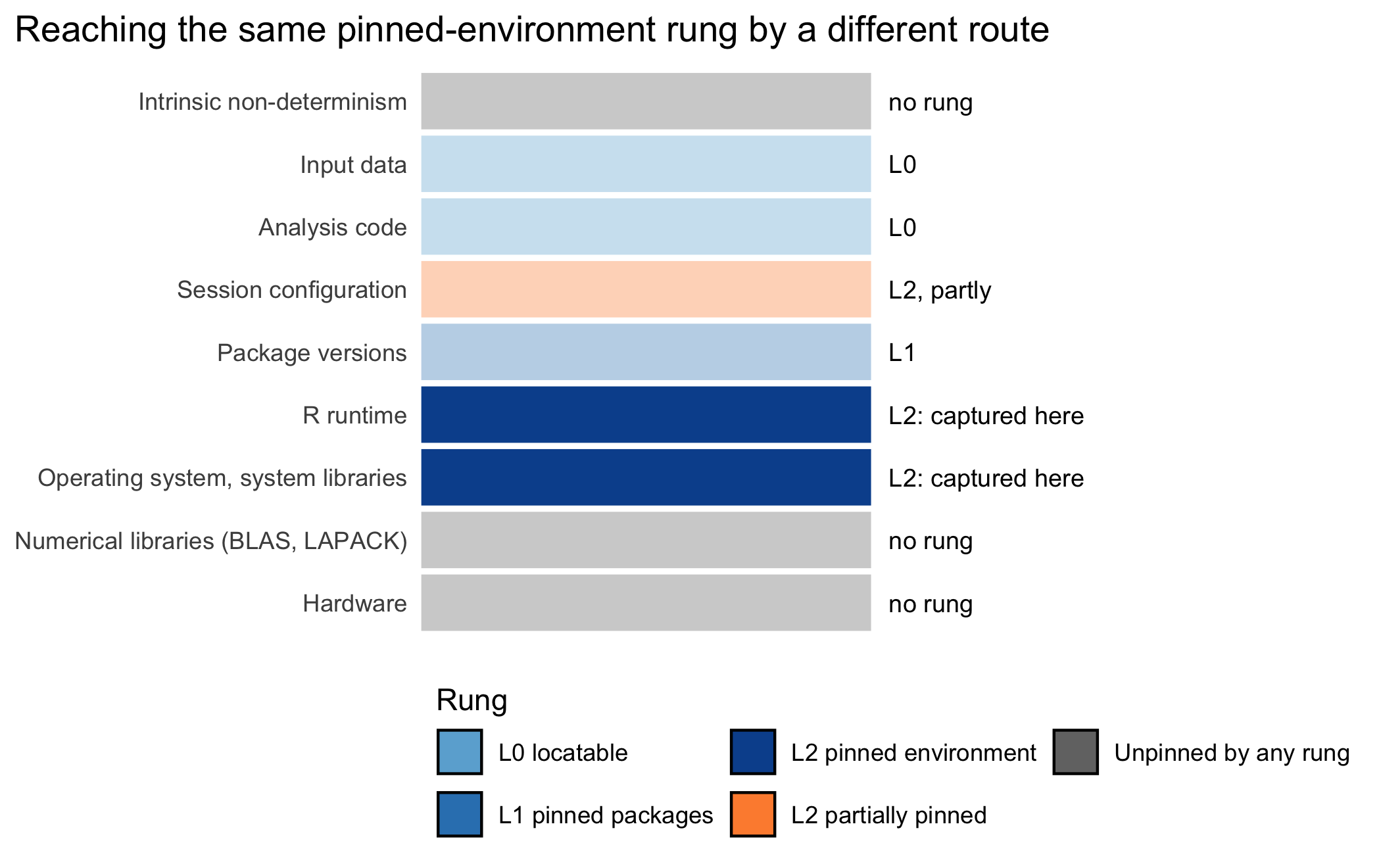
Using Singularity containers, developers can work in reproducible environments of their choosing and design, and these complete environments can easily be copied and executed on other platforms.
Kurtzer, Sochat, and Bauer, Singularity: Scientific Containers for Mobility of Compute (2017)
By the end of this chapter you will be able to take any of three situations and name the one alternative to Docker that fits, chosen by the constraint that actually binds. The situations are a job a cluster’s scheduler refuses to run under Docker, a laboratory that has declined to license Docker Desktop, and a reviewer who will install nothing. The alternatives are Podman, Apptainer, Nix, the conda family, and Binder, each a route to the pinned-environment rung that Chapter 7 reaches with Docker.
This chapter captures nothing beyond what Chapter 7 already pinned. Its subject is reaching the identical rung by a different road. Figure 8.1 marks the same two layers Docker’s chapter captures, the operating system and system libraries, and the R runtime. Here they are reached by Podman, Apptainer, Nix, conda, or a remote service instead of a locally built Docker image.
plot_determinant_stack(
captures = c('Operating system, system libraries', 'R runtime'),
title = 'Reaching the same pinned-environment rung by a different route')In Chapter 7 we reached the pinned-environment level, L2 on the ladder of Chapter 3, by packaging an analysis inside a Docker image. Such an image fixes the operating system, the system libraries, and the R interpreter that a lockfile alone leaves to chance. It is easy to come away from that chapter believing that Docker is reproducibility, that the two words name the same thing. They do not. Docker is one instrument for reaching L2, and a reader who mistakes the instrument for the goal will be at a loss the first time Docker is unavailable, unwanted, or forbidden.
Consider three health scientists who cannot simply follow the Docker recipe of the previous chapter. The first runs a large simulation study that must execute on a shared university cluster, where the scheduler will not grant her the administrative privileges that Docker’s standard, root-owned daemon requires. The second works in a laboratory of Windows machines and a pipeline that mixes R with Python, a combination that sits awkwardly inside the Rocker images. The third has prepared a teaching blog and wants a reviewer to re-run a single post in a browser, installing nothing at all. Each needs the pinned environment that L2 names; none of them can obtain it in the ordinary Docker way. In this chapter we shall see that the ladder does not depend on any one tool, and how to choose among the alternatives by the constraint at hand.
The framework this book uses organizes those alternatives along three axes. The organization is worth internalizing before any command is typed, because it prevents the common error of treating every unfamiliar tool as a special case. The first axis changes only the runner: a different program runs the very same image, and nothing about its pinning, its packages, or its base is reinstalled. The second axis changes the environment model itself, dispensing with the container and declaring the environment directly, so that the pinned environment is reached by a different mechanism. The third axis keeps the container but moves it off the analyst’s machine, into a browser or a hosted service, so that the person reproducing the work provides no environment of their own. A tool belongs to exactly one axis, and knowing which axis a tool occupies tells the analyst almost everything about what it does and does not change. We take up the axes in that order once the analyst’s contribution has been stated.
No tool in this chapter chooses itself. Three judgments remain the analyst’s, and they are the substance of the chapter.
Diagnose the constraint before selecting the tool. The decisive question is usually which constraint is binding. Candidates include an absence of administrative rights on a cluster, an operating system, a mixed-language pipeline, a licensing term, a reviewer’s patience, or a demand for maximum rigor. The analyst identifies the binding constraint first, and the constraint usually selects the axis, and often the tool.
Locate each alternative on the correct axis. A great deal of confusion in practice comes from treating Podman, Nix, and Binder as interchangeable answers to one question. They are answers to three different questions. The analyst who keeps the axes distinct will not, for example, expect Podman to solve a Windows-and-Python problem, nor expect Nix to spare a reviewer an installation.
State the level each option actually reaches. A Podman run of a digest-pinned image reaches L2 exactly as the Docker run did, and a Nix declaration reaches L2 without a container. A Binder session reaches L2 for the duration of the session but pins nothing on the reviewer’s own machine. The analyst reports the level honestly and never lets the novelty of a tool inflate the claim.
root superuser privilege. A requirement on shared clusters, where users are not administrators.We begin with the cheapest of the three changes, because it changes the least. The image built in Chapter 7, pinned to its base by content digest and installing its packages from a dated snapshot, is a standard OCI image. Docker is the program that ran it, but the image does not belong to Docker; any OCI-compatible runtime can run it. Selecting a different runtime changes one parameter. The base image, the digest pin, the dated snapshot, and the lockfile all carry over unchanged, and only the command that launches the container differs.
Podman is a daemonless, rootless, Docker-command-compatible runtime. Where Docker interposes a background daemon running with elevated privilege, Podman runs the container directly under the invoking user’s account. Its command-line interface is close enough to Docker’s that podman run stands in for docker run in most cases:
$ podman build -t myproject .
$ podman run --rm -v "$(pwd)":/project myproject \
    Rscript -e 'source("analysis/run.R")'
Two properties recommend Podman to the health scientist. The first is that, being daemonless and rootless, it runs on a multi-user Linux machine where an analyst has no administrative rights, a situation in which Docker’s daemon is often simply unavailable. The second concerns licensing, and it catches many university users unawares. Docker Desktop, the packaged Docker distribution for macOS and Windows, is under its current terms not free for use by larger commercial and institutional organizations, and many universities fall within those terms. The terms do carve out an exception for education, but institutions differ on whether a given use qualifies. The point is contested, which is why many institutions either license Docker Desktop or avoid it. Podman carries no such restriction. For an analyst whose institution has declined to license Docker Desktop, Podman reaches the same L2 environment, from the same image, at no licensing cost.
Apptainer, known until its move to the Linux Foundation as Singularity, is the runtime built for high-performance computing (Kurtzer et al., 2017). Kurtzer and colleagues designed it for the setting that defeats Docker on a cluster. It runs unprivileged, integrating with the batch schedulers, message-passing libraries, and graphics processors that scientific clusters provide. A user with no administrative rights can nonetheless run a containerized analysis under the cluster’s job system.
Two rules govern its use, and observing them keeps the image pinning of Chapter 7 intact. The first is that an Apptainer image should be built from the digest-pinned Docker image, never authored independently, so that the build recipe stays pinned end to end. The SIF file Apptainer produces gets its own content hash, computed over the converted single-file format, not the same bytes as the Docker digest. The two checksums therefore differ. (Apptainer does not claim to preserve the OCI digest identity into the SIF hash; what is pinned is the input to the conversion, not the output’s checksum.) The build and a subsequent run look as follows:
$ apptainer build env.sif \
    docker://ghcr.io/lab/env@sha256:9f2c...

$ apptainer exec env.sif \
    Rscript -e 'source("analysis/run.R")'
The second is that the single file Apptainer produces, the SIF, is itself an archival artifact. Unlike a Docker image, which lives in a layered local store, an Apptainer image is one file that can be checksummed, deposited in a data repository, and cited alongside the compendium. It is thus both the thing that runs the analysis on the cluster and the thing that is archived to let others run it later. That is a convenient coincidence for the verification of Chapter 12.
The expected pattern, and the one we recommend, is to develop on the laptop with Docker or Podman and to run at scale on the cluster with Apptainer, all from a single image. Nothing is reinstalled for the cluster. Apptainer repackages the pinned image into SIF, carrying the content over from the same digest and converting only the format, so the same pinned environment runs under a different program.
This is the point at which the archetypes of Chapter 5 begin to matter. A simulation study, which may need to run thousands of replicates across the nodes of a cluster, is the archetype that most naturally reaches for Apptainer. The SIF file travels to the cluster, the scheduler runs it unprivileged across many cores, and the same file is later deposited as the archival record of the environment. A plain data-analysis project that runs comfortably on a laptop has no such need and is better served by Docker or Podman.
The second axis is a deeper change. Here we abandon the container altogether and declare the environment directly, reaching the pinned environment by a different mechanism.
Nix is a purely functional, input-addressed package manager (Dolstra et al., 2004). ‘Purely functional’ means that the installed environment is a function of a declaration: given the same declaration, Nix reconstructs the same package set and dependency graph on the same platform, at a later time. ‘Input-addressed’ means that every built component is identified by a hash of its inputs. A reference therefore cannot silently come to mean something else, which is the mutable-tag failure we guarded against in Chapter 7 by pinning digests. Input addressing fixes what goes into each build, not that every build produces bit-identical output, and the platform still matters. Dolstra, in the work that introduced Nix, made this purely functional model the organizing principle of the design, and that property is what recommends Nix here.
The decisive fact for our purposes is that a single Nix declaration fixes the R version, the R packages, and the system libraries together. It therefore reaches the pinned-environment level, L2, without a container at all. This is why the ladder of Chapter 3 speaks of ‘a Docker or Nix image’. Nix is not a supplement to the container, in the way that renv is a supplement, but a peer of it, an alternative road to the same rung.
The obstacle is that the Nix language is unfamiliar to almost every biostatistician, and this is the dominant reason it is not the default. The rix package removes much of that obstacle by generating the Nix declaration from R, in R idiom that a health scientist already knows (Rodrigues & Baumann, 2024). Rodrigues and Baumann designed rix so that the analyst writes a familiar R call and rix writes the Nix:
That call produces a default.nix file, the declaration that pins the environment. A reader need not master the Nix language to recognize its shape; a minimal default.nix reads, in outline, as follows:
let
  pkgs = import (fetchTarball
    "https://github.com/rstats-on-nix/nixpkgs/archive/<date>.tar.gz")
    {};
  rpkgs = with pkgs.rPackages; [ dplyr ggplot2 targets ];
  system_packages = with pkgs; [ R glibcLocales ];
in
pkgs.mkShell {
  buildInputs = [ rpkgs system_packages ];
}
The pinned nixpkgs snapshot, written as <date> above, is the analogue of the base-image digest: it fixes the set of package definitions from which the environment is built. Current versions of rix point at a dated branch of rstats-on-nix/nixpkgs, a fork of nixpkgs its maintainers keep for R, rather than at a commit of the main NixOS/nixpkgs repository. Since version 0.18.3 the generated fetchTarball also carries the archive’s sha256, so a moved branch fails the build rather than changing the environment; older versions omit it. A full commit hash in place of the date is stricter still. Entering the environment is then a single command, and no image is built:
$ nix-shell default.nixNewer Nix workflows prefer a flake, a flake.nix paired with a generated flake.lock that records the exact pin, the direct analogue of renv.lock. Because flakes remain behind an experimental flag in current Nix, the framework tolerates both the classic default.nix and the flake form, and the reader will encounter both in the wild.
Nix has trade-offs on both sides. On the plus side, it delivers the entire environment pillar in one mechanism and reaches L2 without the container machinery. Its input-addressed builds pin the whole dependency graph from one declaration, where Docker reaches a comparable pin only through careful digest and snapshot discipline. On the minus side, the Nix model is alien to the audience. Although rix hides much of the language, diagnosing a build that has failed still calls for some Nix knowledge. The first build is slow and consumes substantial disk. Nix is a host prerequisite comparable to Docker, requiring Linux, macOS, or the Windows Subsystem for Linux. And rix is young enough that its own version must be pinned. These caveats are the reason Nix is carried as an opt-in backend for the analyst who wants maximum rigor, while renv with a container remains the accessible default.
Two neighbors of Nix deserve mention, because a reader will meet them and should know where they sit. GNU Guix is Nix’s close sibling, sharing the purely functional, input-addressed model, with a smaller R ecosystem. For the health scientist it is best understood simply as Nix’s relation, reaching the same rung by the same idea.
The conda family occupies a different middle ground, and it answers two constraints the container route handles awkwardly. Conda (Anaconda Inc., 2023), with the faster resolver mamba and the lockfile-oriented pixi (prefix.dev, 2024), installs and runs directly on Windows, without the WSL2 or Hyper-V virtual machine a Docker (or Podman) image requires there. This is a practical advantage, but not a guarantee that any given package is available. Conda-forge’s Windows (win-64) build coverage for R packages is narrower than its Linux coverage. A pipeline that needs a package without a win-64 build therefore still needs a fallback, and ‘reproduces on Windows’ should be read as ‘for the packages that conda-forge actually ships there’. Conda also spans R and Python in a single environment, so the mixed-language analyst need not bridge two toolchains. For a Windows-only laboratory running a pipeline that mixes the two languages and whose packages are available on win-64, this is a decisive practical advantage. The cost is rigor: conda draws its packages from conda-forge rather than from CRAN or the Posit Package Manager, and it pins less strictly than Nix. It is a middle-ground option, more reproducible than an unpinned install and less exacting than Nix. It is the right choice when its two native strengths, running directly on Windows and spanning two languages, are the binding constraint and the required packages are available there.
This chapter describes as many as five routes to L2, the pinned environment: Podman, Apptainer, Nix through rix, a Binder session, or a devcontainer. Describing a route is not taking it, and ‘The cohort, continued’ below computes which, if any, the book’s own compendium has taken. Even a route taken is not verified until a clean rebuild is compared against a recorded baseline within a stated tolerance, which is what L3 requires. A default.nix or a SIF file in a repository is a claim of L2, no more, until Chapter 12’s baseline test has actually been run (habit 7).
The third axis keeps the container but moves it off the analyst’s machine. The pinning is unchanged; what changes is who runs it. This axis answers one limitation, the learning curve and installation burden that a container imposes on the person reproducing the work; the container format itself is kept.
Binder runs a compendium’s container in the browser, so that a reviewer or reader installs nothing whatever (Project Jupyter et al., 2018). Jupyter’s Binder service reads the configuration files already present in a well-formed compendium, builds the environment on a hosted server, and serves it as an interactive session reached by a single link. For the health scientist the appeal is that a reviewer clicks a link and is inside the running environment, with no Docker, no Nix, and no local installation of any kind.
Two qualifications follow from how Binder works. First, the service, through its repo2docker tool, builds its own image from the repository’s configuration files; it does not pull a registry digest. A .binder/ directory of install.R and runtime.txt files yields an environment resolved on Binder’s server, not the digest-pinned image of Chapter 7. Binder runs that pinned image only when the configuration is a .binder/Dockerfile whose FROM line names the digest, and the image must also serve Jupyter, which a rocker/binder base provides, with jupyter-rsession-proxy for RStudio. Second, the public service limits each session’s memory and lifetime. The honest level is then L2 for the life of the session, and only when the image is the pinned one. Nothing is pinned on the reviewer’s own machine, and the session does not persist. Binder suits demonstration and review; it is not an archival guarantee.
Development containers, and the hosted Codespaces service built on them, bring the same pinned environment into an editor rather than a browser (Development Containers Project, 2022). A .devcontainer/ configuration in the compendium describes the environment, and a compatible editor or the Codespaces service builds and opens it. A collaborator then edits and runs inside the pinned environment without assembling it locally. The principle is the same presence-driven one we have met throughout: the configuration file’s existence drives the automated build.
Here again the archetype guides the choice. A blog or a manuscript archetype, whose whole purpose is to be read and its results inspected by others, benefits most from browser execution. A reader of a teaching post, or a reviewer of a manuscript, re-runs the analysis in Binder with nothing to install, which is the low-friction path such archetypes want. A blog that renders many posts gains the most, since each post becomes independently re-runnable by a reader at a link. A simulation archetype, by contrast, gains little from browser execution and much from the cluster, which is the Apptainer story of the first axis. The reproducibility machinery is the same across all archetypes; the archetype decides only how it is delivered.
With the three axes laid out, the governing question, as the analyst’s first contribution insisted, is which constraint binds. We answer it by setting the guidance beside a compact comparison, generated at build time from the same tibble that a reader could inspect directly.
library(tibble)
library(knitr)

comparison <- tibble(
  name = c(
    "Docker", "Podman", "Apptainer",
    "Nix (via rix)", "Guix", "conda / pixi",
    "Binder", "Devcontainer / Codespaces"
  ),
  axis = c(
    "runtime", "runtime", "runtime",
    "backend", "backend", "backend",
    "remote", "remote"
  ),
  pins = c(
    "the image (OS, R, libraries)",
    "the image (OS, R, libraries)",
    "the image, as one SIF file",
    "R, packages, system libraries",
    "R, packages, system libraries",
    "R and Python packages, less strictly",
    "the image (server-side, per session)",
    "the image (in the editor)"
  ),
  container = c(
    "yes", "yes", "yes",
    "no", "no", "no",
    "yes (hosted)", "yes (hosted)"
  ),
  best_fit = c(
    "the default local runtime",
    "licensing constraint; rootless Linux",
    "an HPC cluster; archival SIF",
    "maximum rigor; input-addressed builds",
    "a Nix-aligned site",
    "Windows-only or mixed R and Python",
    "a reviewer who installs nothing",
    "a collaborator editing in the environment"
  )
)

kable(
  comparison,
  col.names = c(
    "Name", "Axis", "What it pins",
    "Container?", "Best-fit setting"
  )
)| Name | Axis | What it pins | Container? | Best-fit setting |
|---|---|---|---|---|
| Docker | runtime | the image (OS, R, libraries) | yes | the default local runtime |
| Podman | runtime | the image (OS, R, libraries) | yes | licensing constraint; rootless Linux |
| Apptainer | runtime | the image, as one SIF file | yes | an HPC cluster; archival SIF |
| Nix (via rix) | backend | R, packages, system libraries | no | maximum rigor; input-addressed builds |
| Guix | backend | R, packages, system libraries | no | a Nix-aligned site |
| conda / pixi | backend | R and Python packages, less strictly | no | Windows-only or mixed R and Python |
| Binder | remote | the image (server-side, per session) | yes (hosted) | a reviewer who installs nothing |
| Devcontainer / Codespaces | remote | the image (in the editor) | yes (hosted) | a collaborator editing in the environment |
Read as guidance, the table resolves into a short set of recommendations, each keyed to a binding constraint. When the destination is an HPC cluster and the analyst has no administrative rights, the choice is Apptainer, built from the same digest-pinned image and run under the scheduler. The SIF file then doubles as the archival deposit. When the setting is a Windows-only laboratory, or the pipeline mixes R and Python, the choice is the conda family, pixi in particular. It reproduces natively on Windows and spans both languages at the cost of strict pinning. When a reviewer must install nothing, the choice is Binder, which serves the running environment in a browser for the life of a session. When the project demands maximum rigor and the team can absorb the learning curve, the choice is Nix through rix, whose input-addressed builds reach L2 without a container. And when the obstacle is a licensing constraint, an institution that has not licensed Docker Desktop, the choice is Podman. Podman reaches the identical L2 environment from the identical image at no licensing cost. The default, for the analyst under none of these constraints, remains Docker with renv, the composition of Chapter 7.
We now step back from the hypotheticals and apply the same three axes to this book’s own running cohort compendium, as this repository holds it now. Two of this chapter’s three axes presuppose an image already exists to act on; the third does not, and the check below turns on that difference.
repo_root <- '../..'
backend_artifacts <- c(
  renv.lock = file.exists(file.path(repo_root, 'renv.lock')),
  Dockerfile = file.exists(file.path(repo_root, 'Dockerfile')),
  default.nix = file.exists(file.path(repo_root, 'default.nix')),
  devcontainer = file.exists(
    file.path(repo_root, '.devcontainer', 'devcontainer.json')))
backend_artifacts
#>    renv.lock   Dockerfile  default.nix devcontainer
#>         TRUE        FALSE        FALSE         TRUE
Of the four artifacts, the check finds renv.lock and devcontainer and misses Dockerfile and default.nix. By the ladder of Chapter 3 the compendium is therefore at L1. The devcontainer file is an instance of axis three, a development container, but its own comments say plainly that it is a stand-in. It starts from a generic rocker/verse:4.4.0 image, not one built from this compendium’s own pinned recipe, because that recipe does not exist yet. It lets a collaborator open an editor already inside a working R environment, at the cost of pinning nothing specific to the cohort analysis itself. Axis one has nothing to act on, because Podman and Apptainer both swap the runtime over an existing image, and there is none yet to swap. Axis two is the one route open without waiting on any other chapter. A default.nix generated by rix could pin the cohort compendium’s R version, packages, and system libraries directly, reaching L2 without any Dockerfile. No such declaration has been built yet, so this chapter leaves the compendium at L1; it only widens which door could be opened first.
To make the axes concrete, consider a single research group with one image and three destinations, which is a common situation once a project matures. The group has built a pinned image for a cohort-analysis compendium, ghcr.io/lab/cohort-env, resolved to an immutable digest.
On the analyst’s own laptop, at an institution that has declined to license Docker Desktop, the image runs under Podman with no change to the image and no licensing cost:
$ podman run --rm -v "$(pwd)":/project \
    ghcr.io/lab/cohort-env@sha256:9f2c... \
    Rscript -e 'source("analysis/run.R")'
When a sensitivity analysis must be repeated across many simulated cohorts, the work moves to the university cluster. The analyst builds a SIF from the same digest and submits it to the scheduler. Nothing is rebuilt, and the image contents are the same ones pinned on the laptop, because the SIF was built from that one digest and not reauthored. The SIF pins the recipe; it does not control what the cluster passes into the run.
By default, Apptainer binds the user’s $HOME into the container and passes host environment variables through into the container (Apptainer Project, 2024). A stray R_LIBS_USER or locale variable set on the cluster login node can therefore still leak into execution, even though the image itself did not change. The --cleanenv flag drops the inherited environment variables, and only those. The host $HOME stays mounted, and with it any ~/.Rprofile, ~/.Renviron, and user package library under ~/R, which R inside the container still reads. A verified run therefore adds --no-home, binds only the project directory with --bind "$PWD", and starts R with --vanilla so that no startup file is read. The combination --containall --bind "$PWD" --pwd "$PWD" isolates the same things; without --pwd it starts the job in the container’s home directory, where relative paths such as analysis/simulate.R no longer resolve.
$ apptainer build cohort-env.sif \
    docker://ghcr.io/lab/cohort-env@sha256:9f2c...

$ apptainer exec --cleanenv --no-home --bind "$PWD" \
    cohort-env.sif \
    Rscript --vanilla -e 'source("analysis/simulate.R")'
Finally, when the paper is submitted, a reviewer wishes to re-run the principal figure without installing anything. The compendium carries a short .binder/Dockerfile that starts from the same digest and copies the repository into the session’s home directory, as Binder requires. This works only because the group built cohort-env on a rocker/binder base, so the image already serves Jupyter and RStudio and has the required user:
Binder builds from that file on a hosted server and serves the environment in the browser, reached by a single link in the cover letter. A .binder/ of install.R and runtime.txt would instead make Binder resolve an environment of its own, which is not the pin the laptop and the cluster share.
The three destinations used three tools, drawn from two of the three axes, and one image throughout. The pinning was done once, in Chapter 7; this chapter merely ran it in three places. Had the group instead chosen Nix from the outset, the image would have been replaced by a default.nix, and the laptop and cluster runs would have entered the environment through nix-shell rather than a runtime. The discipline, one pinned declaration exercised in several places, would have been identical.
This section is supplementary to an already-optional chapter, and the reader may skip it freely if the cluster destination above was enough. It extends that story with the submission mechanics a real cluster imposes, because knowing that Apptainer is the right tool does not by itself tell an analyst how a job reaches the scheduler.
Three realities of a shared cluster shape the script below. First, the analyst has no administrative rights on any node. As explained above, Apptainer runs unprivileged, so a job submitted under the analyst’s own account can still execute a containerized analysis, and that is why it is the standard choice on shared clusters. Second, the SIF file typically sits on a shared, read-only filesystem mounted on every compute node. The image is built once, usually on a login node or a separate build host with outbound network access, since compute nodes are often firewalled from the registry the image is pulled from. Third, and most consequentially, the analyst cannot install anything at the operating-system level once that image is built and placed on the shared filesystem. There is no apt install to fall back on from inside a running job. On a cluster, then, the pinning discipline of Chapter 7 is a requirement: the SIF built from the digest-pinned image is the only environment the job will ever see, for the life of the allocation.
A minimal submission script for the cohort-analysis image introduced in the worked example above looks like this:
#!/bin/bash
#SBATCH --job-name=cohort-analysis
#SBATCH --partition=general
#SBATCH --time=02:00:00
#SBATCH --mem=8G
#SBATCH --cpus-per-task=4
#SBATCH --array=1-100
#SBATCH --output=cohort-analysis-%A_%a.log

apptainer exec --cleanenv --no-home --bind "$PWD" \
    --env SLURM_ARRAY_TASK_ID="$SLURM_ARRAY_TASK_ID" \
    --env SLURM_CPUS_PER_TASK="$SLURM_CPUS_PER_TASK" \
    /shared/images/cohort-env.sif \
    Rscript --vanilla -e 'source("analysis/simulate.R")'
The #SBATCH lines are directives Slurm’s sbatch command reads out of the script before any shell code runs. They specify the partition to queue on, a wall-clock time limit, a memory reservation, a core count, an array of 100 tasks (one per simulated replicate set), and a destination for each task’s combined output. In the output name, %A is substituted for the array’s job ID and %a for the task’s index. An analyst with access to a compliant cluster would submit the script with sbatch run-cohort.sh.
The apptainer exec line carries the same flags met in the Pitfall above, applied here to a batch job. Slurm’s own job environment carries login-node variables, module loads, and whatever a cluster’s site-wide profile sets, into the job by default. This is the batch-system version of the leakage the Pitfall described for an interactive shell. --cleanenv drops those variables, --no-home keeps the host home directory and its R startup files and user library out of the container, --bind "$PWD" exposes the project directory the job was submitted from, and --vanilla stops R reading any startup file. The job then runs against the image’s own pinned packages and nothing the cluster happened to load on the analyst’s behalf. Because --cleanenv also strips the SLURM_* variables, the script passes back the two the analysis needs with --env. SLURM_ARRAY_TASK_ID tells simulate.R which replicate set to run, and should also choose its seed. SLURM_CPUS_PER_TASK tells it how many cores it was granted. The image of Chapter 7 pins OMP_NUM_THREADS and OPENBLAS_NUM_THREADS to 1, so the four requested cores are used only if the script itself runs R-level parallel work across that count; a script that does not should request one core.
This script’s #SBATCH directive syntax is inspected against standard Slurm usage, not verified end to end. No Slurm cluster was available to actually submit it. The script should be treated as an illustrative template to adapt to a given site’s partition names and resource limits, not as a script copied and run unexamined.
A language model is a capable assistant for the mechanics of this chapter and a poor judge of its trade-offs. The commands and recipes it helps with need no data, but they can name it, and the prompts should keep them from doing so.
One rule comes first (habit 3). Never paste or upload protected health information, identifiable records, or data held under a data use agreement, nor outputs derived from them, into a model or a coding agent unless three conditions all hold. The institution has approved that endpoint for that class of data. The IRB protocol and the consent permit the processing. The data use agreement, or the provider’s terms, permits it. If any of the three is unclear, the answer is no.
The third condition is the one most often missed. Institutional approval of a tool does not override the terms under which a data provider released the data. NIH, for example, treats sharing controlled-access data through prompts with public generative AI tools, which it glosses as third-party tools, as a breach of the data use certification. It treats a model trained on such data as a data derivative, to be shared only with other approved users and not kept after the project closes (National Institutes of Health, 2025).
Describe the structure instead: the column names and types, or a small synthetic example generated from the data dictionary, never edited from real rows. A coding agent sees whatever files are in its working tree, so run it in a checkout or container where the real data is not mounted.
An agent also acts, so confine it to a branch and keep merges, pushes, and deposits for yourself (Section 2.10.1).
Any host path that names a site, study, or participant should be replaced with a placeholder before a command is pasted. For the commands of this chapter, what a coding agent can see runs through the bind mount: whatever -v or --bind names is visible to an agent that runs them. The following triples show where each stands.
Prompt. ‘Convert this docker run command to the equivalent Podman and Apptainer commands, preserving the bind mount and the digest-pinned image.’
Watch for. Check that the --platform flag survives, that the Apptainer bind syntax is the real one and not an invented --volume form, and that the digest, not a mutable tag, was translated. A tag in place of the digest silently undoes the pin.
Verification. Run the translated command and confirm it executes the analysis; confirm the digest, not a tag, appears in the Apptainer docker:// reference; and confirm the bind mount exposes the working tree as expected.
A better prompt. ‘Convert the attached docker run command, which uses --platform linux/amd64, a digest-pinned image, and one bind mount of the working tree, to Podman and to Apptainer. Keep the digest, the platform, and the mount target unchanged, and add no other mounts. For each command, give the check that shows which image digest ran and which host directory the container could see.’
Prompt. ‘Write a rix::rix() call that pins R 4.4.1 with dplyr, ggplot2, and targets, producing a default.nix.’
Watch for. Check that the answer is the rix call requested rather than hand-written raw Nix, that the nixpkgs revision, the whole point of the pin, is present, and that every package exists under pkgs.rPackages.
Verification. Run the rix call, inspect the generated default.nix for a concrete pinned revision, and enter the environment with nix-shell to confirm the packages load. A declaration that builds is the only evidence that counts.
Prompt. ‘My analysis mixes R and Python and my lab uses Windows. Should I use Nix, Podman, or conda?’
Watch for. Check whether the recommendation follows the constraint or a tool’s general reputation, and whether it overstates a tool’s rigor, for example by presenting conda as reaching the same level as Nix.
Verification. Check the recommendation against the binding constraint: mixed languages on Windows point to the conda family, whatever a tool’s general reputation. The analyst, not the model, owns the honest statement of the level reached.
Take a Docker image you have built in a previous chapter and run it under Podman without rebuilding it. Confirm that the container starts and that the analysis runs. State, in one sentence, why the reproducibility level is unchanged.
Build an Apptainer SIF file from a digest-pinned docker:// reference. Compute a checksum of the SIF and explain how that single file could serve both as the cluster runtime and as an archival deposit.
Using rix::rix(), generate a default.nix that pins a specific R version and three packages. Locate the pinned nixpkgs revision in the generated file and explain what would change in the built environment if that revision were altered.
For each of the following, name the axis and the single most appropriate tool, and justify the choice in one sentence: (a) a laboratory forbidden from licensing Docker Desktop; (b) a manuscript reviewer who must run a figure with no local installation; (c) a simulation study destined for a shared cluster; (d) a Windows-only pipeline mixing R and Python.
A colleague claims that adopting Nix makes an analysis ‘fully reproducible’. Write a two-sentence reply that corrects the level claim without dismissing Nix, naming the rung Nix reaches and the rung it does not.
Consider a simulation archetype and a blog archetype built from the same compendium machinery. Describe which runtime or backend each most naturally uses and why the underlying pinning is nonetheless identical.
Run the artifact check from ‘The cohort, continued’ against this repository (or reconstruct it with file.exists()), and report the four TRUE/FALSE values in the order renv.lock, Dockerfile, default.nix, devcontainer. Name the one axis that could lift the cohort compendium to L2 without requiring any other missing artifact to be built first.
This exercise returns to the digest pinning of Chapter 7 (Chapter 7). Take any digest-pinned base line from that chapter, such as FROM rocker/r-ver@sha256:..., and write (a) the apptainer build command that would convert the image it names into a SIF, and (b) one sentence stating why the SIF’s own checksum differs from the Docker digest even though both were produced from the identical pinned recipe.
Attempt an exercise before expanding its solution. The first three are hands-on and their outputs will vary by machine; the boxes record the reasoning and the expected shape of the result.
| Command or rule | What it does |
|---|---|
podman run ... |
Daemonless, rootless substitute for docker run; same OCI image, same digest, same L2. |
apptainer build x.sif docker://img@sha256:... |
Converts a digest-pinned OCI image into one archival SIF file. |
apptainer exec --cleanenv --no-home --bind "$PWD" x.sif Rscript --vanilla ... |
Runs the SIF with host environment variables cleared, the host $HOME unmounted, the project directory bound (Apptainer’s system binds such as /tmp remain), and no R startup file read; --cleanenv alone clears variables only (see the Pitfall above). |
rix::rix(r_ver=, r_pkgs=, project_path=) |
Generates a default.nix pinning R, packages, and system libraries together. |
nix-shell default.nix |
Enters the Nix-declared environment; no image is built. |
.binder/Dockerfile |
Lets Binder serve the compendium’s pinned image in a browser, per session, when its FROM line names the digest; install.R and runtime.txt make Binder resolve its own environment instead. |
.devcontainer/devcontainer.json |
Lets an editor or Codespaces open the pinned environment directly. |
| Rule of thumb | Diagnose the binding constraint first; it selects the axis, and usually the tool. |
| Rule of thumb | A runtime swap (axis one) changes the runner only; the image, digest, and packages carry over unchanged. |
| Habit 2 | Pin what you ran: the nixpkgs revision and the image digest are the same idea on two axes. |
| Habit 7 | A default.nix or a SIF is a capture claim only, until Chapter 12’s baseline test has run. |
The high-performance-computing runtime is described by its authors in Kurtzer et al. (2017), which sets out the unprivileged, scheduler-integrated design and the single-file image format that make Apptainer, formerly Singularity, the natural cluster companion to a Docker workflow.
The foundational account of the purely functional, input-addressed model is Dolstra et al. (2004). The R front-end that makes it approachable for the health scientist is documented in Rodrigues & Baumann (2024), whose rix package generates the Nix declaration from ordinary R code.
For the conda family as a middle-ground backend, we have two references: the reference documentation of the conda ecosystem (Anaconda Inc., 2023) and that of the lockfile-oriented pixi (prefix.dev, 2024). Together they describe the native-Windows and mixed-language reproduction that distinguishes it from the container route.
The remote-execution axis is introduced by Project Jupyter et al. (2018), whose Binder service runs a compendium’s container in the browser, and by the development-containers specification (Development Containers Project, 2022), which brings the same environment into an editor. Both rest on the presence-driven principle, a configuration file’s existence driving an automated build, that recurs throughout this book and is developed in Chapter 12.
The container backend against which all of these are alternatives is developed in Chapter 7, and the ladder of levels that lets us state honestly what each of them reaches is Chapter 3.