Maintaining a high degree of transparency in scientific reporting is essential not just for gaining trust and credibility within the scientific community but also for facilitating the development of new ideas.
Karthik Ram, Git Can Facilitate Greater Reproducibility and Increased Transparency in Science (2013)
4.1 Learning objectives
By the end of this chapter the reader should be able to:
Describe the failure mode that version control cures, the proliferation of files named analysis_final_v2_FINAL.R and the loss of any record of what changed and why.
Explain the core git model: the repository, the commit as an atomic, message-bearing unit of change, and the commit history as an auditable record of how a result came to be.
Perform the everyday git operations at the shell: staging and committing, reading the log and the diff, and using a .gitignore to keep files out of the history.
Exercise the health-specific judgment of what must never be committed, above all protected health information and identifiable data, and understand why deleting such a file in a later commit does not remove it from the history.
Write an archetype-appropriate .gitignore, and say why a data-analysis compendium and an R-package compendium ignore different files.
Use a remote (GitHub or GitLab) for backup, distribution, and collaboration, including the fork-and-pull-request model for multi-site teams and tags and releases for marking the exact state of an analysis at submission or publication.
Place version control on the reproducibility ladder, as the artifact that first makes an analysis L0 locatable and the substrate on which continuous integration and collaboration are later built, and state plainly the layers of the determinant stack that git does not pin.
4.2 Orientation
Open the folder of almost any analysis that has run for more than a month without version control and the same artifact greets you. There is analysis.R, and beside it analysis_v2.R, analysis_final.R, analysis_final_v2.R, and, inevitably, analysis_final_v2_FINAL.R. A dated copy or two, analysis_2025-03-14.R, sits among them, and a analysis_reviewer.R from the week the referee reports came back. Every file is a manual snapshot, taken because the analyst feared to overwrite a version that worked. The scheme fails in three ways at once. It does not say which file produced the figure in the submitted manuscript. It does not say what differs between any two of them, so recovering a change means reading both side by side. And it does not say why any change was made, because the reason lived in the analyst’s head and is now gone.
This is the failure that version control exists to cure, and the cure is not a tidier naming scheme but a different object. A version-control system keeps a single working copy of each file and records, as a separate and complete history, every state that copy has passed through, together with a note on each change saying what it was and why it was made. The five FINAL files collapse back into one analysis.R, and the four snapshots become four entries in a history that can be read, searched, and, if need be, restored. The tool that has won this role, across the sciences and across software of every kind, is git, and the service that most often hosts a git history on the network is GitHub, with GitLab its principal institutional sibling. This chapter teaches both from first principles, because version control is the single most universally taught element of a modern reproducibility course and the foundation on which the rest of this book stands.
It is also the foundation in a precise, technical sense. Chapter 5 made the compendium the unit of reproducible work, and Chapter 3 placed the bare compendium at the bottom rung of the ladder, L0 locatable. The artifact that marks L0 is exactly a version-controlled repository: an analysis is locatable when, and only when, it is under version control and can therefore be found, read, and referred to by a second person. Everything the later chapters add, the lockfile of Chapter 6, the container of Chapter 7, the continuous integration of Chapter 12, is installed on top of a version-controlled history. Version control is thus not one tool among many but the substrate the others require.
4.3 The analyst’s contribution
Version control automates the mechanics of history perfectly and automates none of the judgment that makes a history useful and safe. Three decisions belong to the analyst and are the subject of this chapter as much as the commands are.
Deciding what must never be committed. A commit is, by design, permanent and copied to every clone of the repository. The judgment of what may safely be made permanent and public, and what must be kept out of the history entirely, is the analyst’s, and in health research it is a judgment with legal and ethical force. Protected health information, identifiable data, and credentials must never enter the history, because, as we shall see, deleting them in a later commit does not remove them from it. This is the first and gravest of the three judgments.
Choosing the granularity and the message of a commit. A commit is a unit of change, and how much change it should contain, and what its message should say, are matters of craft that no tool decides. A history of one enormous commit reading ‘did the analysis’ is almost as useless as no history at all. A history of small, coherent commits whose messages say why each change was made is an audit trail. The difference is entirely the analyst’s discipline.
Deciding when to branch and when to tag. Whether a piece of work warrants a branch of its own, and whether a particular state of the analysis warrants a permanent tag, are design decisions about the shape of the history. They are cheap to make and expensive to omit: the state of the code at the moment a manuscript was submitted is worth a tag, and no tool will place it for you.
NoteThe vocabulary of this chapter
New terms are defined again on first use; they are collected here for reference.
Repository (repo). A directory whose contents and full history git tracks, held in a hidden .git subdirectory. A clone is a complete copy of a repository, history and all.
Working tree. The ordinary files in the repository directory as they currently exist on disk, as opposed to the versions recorded in the history.
Commit. A recorded snapshot of the tracked files at one moment, carrying an author, a timestamp, a message, and an immutable identifier (a hash). The atomic unit of history.
Staging area (index). The set of changes marked, with git add, to go into the next commit. Staging lets a commit hold a chosen subset of the current changes.
.gitignore. A file listing path patterns that git should not track, used to keep derived outputs, large data, and, critically, sensitive files out of the history.
Branch. A movable name for a line of development. The default branch is conventionally called main.
Remote. A copy of the repository hosted elsewhere, typically on GitHub or GitLab, used for backup, distribution, and collaboration. origin is the conventional name of the primary remote.
Tag. A permanent, human-readable name for one specific commit, used to mark a milestone such as a manuscript submission.
Pull request (merge request). A proposal, made on the remote, to merge one branch or fork into another, reviewed before it is accepted.
4.4 What version control records, and what it cures
The value of a version-control system is easiest to state as the negation of the FINAL-file failure. That failure loses three things, and version control restores each.
It loses the identity of the working version. With a drawer of dated copies, no file is authoritative; with git, there is one analysis.R, and its history holds every prior state, so the question ‘which version is current’ cannot arise. It loses the content of each change. Two snapshot files differ in ways that can be recovered only by comparing them line by line by hand; a git history presents each change as a diff, a precise statement of the lines added and removed, that git computes on demand from the snapshots it stores, since git keeps full snapshots, not diffs. And it loses the reason for each change, the single most valuable and most perishable piece of information about an analysis. Why was the outlier-exclusion threshold changed from three standard deviations to two? A dated file cannot say. A commit whose message reads ‘Tighten outlier threshold to 2 SD per reviewer 2’s comment’ says exactly, and says it forever.
This last point is worth dwelling on, because it is the one that turns version control from a convenience into an instrument of scientific accountability. A computational result is not only a number; it is the end of a chain of decisions, each of which could have gone otherwise. In a regulated analysis, a clinical trial subject to audit, a study destined for a guideline, the chain of decisions is itself an object of scrutiny, and ‘why did the estimate change between the interim and the final analysis’ is a question an auditor is entitled to ask and the analyst is obliged to answer. A commit history in which each change carries its reason is the answer, already written, timestamped, and attributable. The history is the audit trail.
4.5 The git model: repository, commit, history
Git is often taught as a list of commands to memorize, which is why it is so often found bewildering. It is far better understood as a small and coherent data model, after which the commands are obvious. There are three ideas.
The first is the repository. A git repository is an ordinary directory, your project, that git has been told to track, whereupon it maintains, in a hidden .git subdirectory, the complete history of everything under that directory. The ordinary files you edit are the working tree; the .git directory is the history. Creating a repository is a single command run once in the project directory.
cd diabetes-cohortgit init
The second idea, and the central one, is the commit. A commit is a snapshot of the tracked files at one moment, recorded together with four things: who made it, when, a message describing it, and a hash that names it. That hash, a forty-character SHA-1 string usually shown in an abbreviated form such as a1b2c3d, is computed not from the snapshot alone but over the whole commit object, which references the snapshot, folds in the metadata, and, crucially, records the hash of the commit before it. (Git also supports repositories that use the longer SHA-256 hash of sixty-four characters, though SHA-1 remains the default.) Because each commit’s hash incorporates its parent’s, the history is a chain in which no past entry can be altered without changing its hash and the hash of every commit after it. This is what makes a git history tamper-evident, a property of some consequence for a regulated analysis: the record cannot be quietly rewritten. The hashes are, for practical purposes, unique, and git guards against the known SHA-1 collision attacks with built-in collision detection.
The third idea is the history itself, the chain of commits, each pointing back to its parent, running from the first commit to the most recent. Reading that chain is reading the story of how the analysis came to its current state. A branch, which we treat below, is nothing more than a movable name pointing at one commit in this structure.
The everyday cycle of work has just two steps against this model, and they exist because git deliberately separates choosing what goes into a commit from making the commit. First one stages the changes to be recorded, with git add; then one commits the staged changes, with git commit, attaching the message. The staging step is not ceremony: it lets a single commit hold a coherent subset of the work in progress, so that an afternoon’s editing across several concerns can be recorded as several focused commits rather than one indiscriminate lump.
# edit analysis.R, then see what has changedgit status# stage the file for the next commitgit add analysis.R# record the staged change with a messagegit commit -m"Add Cox model for 30-day readmission"
A note on the message, since it is the part that carries the scientific value. The convention, and it is worth adopting from the first day, is a short imperative summary line of about fifty characters, optionally followed by a blank line and a paragraph giving the why. ‘Fix bug’ is a wasted message. ‘Correct person-time denominator to exclude pre-enrollment follow-up’ is a message that will still be intelligible, and still exculpatory, at an audit three years later.
NoteCheck your understanding: why stage at all?
A colleague argues that the staging area is needless friction: since one almost always wants to commit everything one has changed, git should simply commit the whole working tree and spare the analyst a git add. What does the staging step buy that a commit-everything model would lose?
NoteAnswer
It buys the ability to make a commit an atomic unit of one idea rather than a snapshot of whatever happened to be on disk. In an afternoon an analyst may fix a bug in the cleaning script, add an unrelated figure, and jot a half-finished note in a third file. Committing all three together produces a history entry that cannot be described in one honest message and cannot be reverted without disturbing unrelated work. Staging lets the analyst record the bug fix as one commit, with its own message and reason, and the figure as another, leaving the unfinished note uncommitted. The audit trail is only as good as the coherence of its individual commits, and staging is the mechanism that coherence requires. (For the genuine everyday case where one does want everything, git commit -a stages all tracked changes in one step, so the friction is opt-out, not mandatory.)
4.6 Reading the history: the log and the diff
A history that cannot be read is of little use, and git provides two complementary views of it. The log is the list of commits, most recent first, each with its hash, author, date, and message. It is the table of contents of the analysis’s development.
# the full loggit log# a compact one-line-per-commit viewgit log --oneline# which commits touched analysis/scripts/git log --oneline-- analysis/scripts/
The diff is the complementary view: not the list of changes but the content of one. git diff shows the changes in the working tree that have not yet been staged; git show displays the full diff of any single commit named by its hash; and git diff between two commit hashes shows everything that changed between them.
# what have I changed but not yet staged?git diff# show one commit's changes in fullgit show a1b2c3d# what changed between two points in the history?git diff a1b2c3d f4e5d6c
Together the log and the diff answer the two questions the FINAL-file drawer could not: when and why did a thing change (from the log) and what exactly did the change consist of (from the diff). To make this concrete, consider the commit history of the first weeks of an incident-diabetes cohort study, rendered below as it might appear to an auditor reviewing how the reported hazard ratio came to be. The table is generated from synthetic data, so that we may display a realistic audit trail without any real project’s contents.
library(tibble)library(dplyr)library(knitr)commit_history <- tibble::tibble(hash =c('a1b2c3d', 'e4f5a6b', 'c7d8e9f','b0a1c2d', 'd3e4f5a', 'f6a7b8c','a9b0c1d'),date =as.Date(c('2026-02-03', '2026-02-05','2026-02-09', '2026-02-12','2026-02-18', '2026-02-24','2026-03-02')),author =c('r.thomas', 'r.thomas', 'r.thomas','a.okafor', 'r.thomas', 'a.okafor','r.thomas'),message =c('Initialise compendium and .gitignore','Add cleaning script for registry extract','Build analysis-ready cohort table','Fit Cox model for 30-day readmission','Tighten outlier threshold to 2 SD per reviewer 2','Add Kaplan-Meier figure to report','Correct person-time denominator'),files_changed =c(2L, 1L, 3L, 1L, 1L, 2L, 1L))commit_history |> dplyr::mutate(date =format(date, '%Y-%m-%d')) |> knitr::kable(col.names =c('Hash', 'Date', 'Author','Message', 'Files'),align =c('l', 'l', 'l', 'l', 'r'))
Table 4.1: A synthetic commit history for the first weeks of a cohort analysis, read as an audit trail. Each row is one atomic, message-bearing commit; together they record not only what changed but, in the message, why. Note the reviewer-driven change to the outlier threshold, the kind of decision an auditor is entitled to trace.
Hash
Date
Author
Message
Files
a1b2c3d
2026-02-03
r.thomas
Initialise compendium and .gitignore
2
e4f5a6b
2026-02-05
r.thomas
Add cleaning script for registry extract
1
c7d8e9f
2026-02-09
r.thomas
Build analysis-ready cohort table
3
b0a1c2d
2026-02-12
a.okafor
Fit Cox model for 30-day readmission
1
d3e4f5a
2026-02-18
r.thomas
Tighten outlier threshold to 2 SD per reviewer 2
1
f6a7b8c
2026-02-24
a.okafor
Add Kaplan-Meier figure to report
2
a9b0c1d
2026-03-02
r.thomas
Correct person-time denominator
1
The reader will note two features that a bare list of files could never carry. The fifth commit records not only that the outlier threshold changed but that it changed in response to a reviewer, and the final commit records a correction to the person-time denominator, the sort of methodological fix whose provenance an auditor will want to establish. The commit history has turned a sequence of edits into a defensible account of how the result was reached.
4.7 What must never be committed: .gitignore and PHI
A commit records the files git is tracking, and by default git offers to track every file in the working tree. Two categories of file must be kept out of that net, and the mechanism for keeping them out is the .gitignore file, a plain-text list of path patterns that git will refuse to track.
The first category is the merely unwanted: files that can be committed but should not be, because they are regenerable or bulky and would only clutter the history. Rendered outputs (a compiled PDF, an .html report, the figures a script regenerates on every run) are the clearest case, because committing them couples the history to products that the code already determines. Large raw data files bloat every clone. Editor and operating-system cruft (.Rhistory, .DS_Store, .Rproj.user/) is pure noise. None of these is dangerous; all of them are better ignored.
The second category is the category that makes this section a matter of ethics and law rather than tidiness: files that must never enter the history because making them permanent and shareable would be a breach. In health research three kinds dominate.
Protected health information and identifiable data. A file containing patient identifiers, dates of birth, medical-record numbers, free-text clinical notes, or any data from which an individual could be re-identified must never be committed. This is the first rule of version control in a health setting, and it admits no exception.
Credentials. Database passwords, API tokens, the contents of a .Renviron holding a secret, private keys: a credential committed to a repository, and worse pushed to a remote, is a credential to be treated as compromised.
Restricted or embargoed data more generally, under a data-use agreement that forbids redistribution, even when not directly identifying.
ImportantDeleting a file does not remove it from the history
The gravest and least intuitive fact about git is that its history is append-only by design. If a file containing protected health information is committed, and the mistake is noticed and the file deleted in a later commit, the file is gone from the working tree but remains in full in the history, recoverable by anyone with a clone from the commit that introduced it. The deletion is itself just another commit layered on top; it conceals nothing. Removing the file from the history requires rewriting the history, with tools such as git filter-repo, which changes every subsequent commit hash, must be forced onto every clone and the remote, and is error-prone precisely when it matters most. Worse, if the offending commit was ever pushed to a remote, one must assume it has been cloned and cached beyond recall, and the only sound response is to treat the exposed data as breached and follow the applicable incident procedure. The remedy is therefore prevention: a correct .gitignore written before the first commit, and the habit of reading git status before every commit to confirm that nothing sensitive has been staged. Never commit PHI, because git is built so that you cannot cleanly take it back.
A .gitignore is a small file, and its content depends on the archetype of the compendium, which is the concrete point at which the archetypes of Chapter 5 touch this chapter. The reproducibility machinery is identical across archetypes; the list of files to ignore is not. A data-analysis compendium ignores its derived outputs and its raw data: the regenerable tables and figures, and the large or sensitive registry extract that must stay out of the history entirely. An R-package compendium has no analysis/ outputs to ignore but must ignore its build artifacts: the .Rcheck directory, the built .tar.gz and binary archives, and the src/ object files a compiled package leaves behind. The two .gitignore files barely overlap, and writing the right one is part of naming the archetype.
# .gitignore for a data-analysis compendium# --- sensitive: never commit ---analysis/data/raw_data/*.Renviron*.pem# --- regenerable outputs ---analysis/figures/*analysis/tables/*analysis/report/*.pdfanalysis/report/*.html# --- editor and OS cruft ---.Rhistory.RData.Rproj.user/.DS_Store
# .gitignore for an R-package compendium# --- build artefacts ---*.tar.gz*.Rcheck/src/*.osrc/*.sodocs/# generated pkgdown site# --- editor and OS cruft ---.Rhistory.RData.DS_Store
Two refinements deserve mention. A leading ! re-includes a pattern otherwise ignored, which is how one ignores a whole data directory but keeps a small, non-sensitive example file or a data dictionary under version control (analysis/data/raw_data/* followed by !analysis/data/raw_data/data_dictionary.csv). And a committed-by-accident file, once added to .gitignore, is still tracked until explicitly untracked with git rm --cached; ignoring a file does not retroactively remove an already-committed copy, which returns us to the warning above.
NoteCheck your understanding: the same file, two archetypes
A report.pdf sits at the top of one analyst’s ignore list and is deliberately committed by another. A data_dictionary.csv describing a restricted registry is committed, while the registry extract it describes is ignored. Explain both choices.
NoteAnswer
The rendered report.pdf is a regenerable output: in a data-analysis or manuscript compendium it is a product the code reproduces on render, so committing it couples the history to a derivative and is usually avoided. An analyst who nonetheless commits it, perhaps to preserve the exact submitted PDF as a fixed reference, is making a defensible different judgment about what the artifact is for. The point is that it is a judgment, not a rule. The data_dictionary.csv and the registry extract sit on opposite sides of the one line that is not a matter of taste. The dictionary carries variable names and codings, which are metadata and safe to share, and belongs in the history so a reader can interpret the analysis. The extract carries the protected health information itself and must never be committed, whatever its convenience. The ! re-inclusion pattern exists precisely to keep the safe metadata while ignoring the unsafe data beside it.
4.8 Branches, lightly
For a solo analyst working linearly, a single line of commits on the main branch is often the whole story, and it is honest to say so rather than to impose ceremony. But two situations make branches worth the small investment of learning them. The first is speculative work: trying an alternative model specification, or a reviewer’s proposed reanalysis, without disturbing the main line that produced the current results. The second is collaboration, treated in the next section, where each contributor works on a branch of their own and the branches are merged only when ready.
A branch is created and switched to in one command, and merged back with another.
# create and switch to a branch for a reanalysisgit switch -c sensitivity-analysis# ... make commits on the branch ...# return to main and merge the branch ingit switch maingit merge sensitivity-analysis
The mental model is the one given above: a branch is a movable name for a line of development, and main is merely the branch git creates by default. Nothing about branching changes the commit model; it only lets two lines of commits coexist and later rejoin. We keep the treatment light here and return to the collaborative use of branches, which is where they earn their keep, when we reach pull requests.
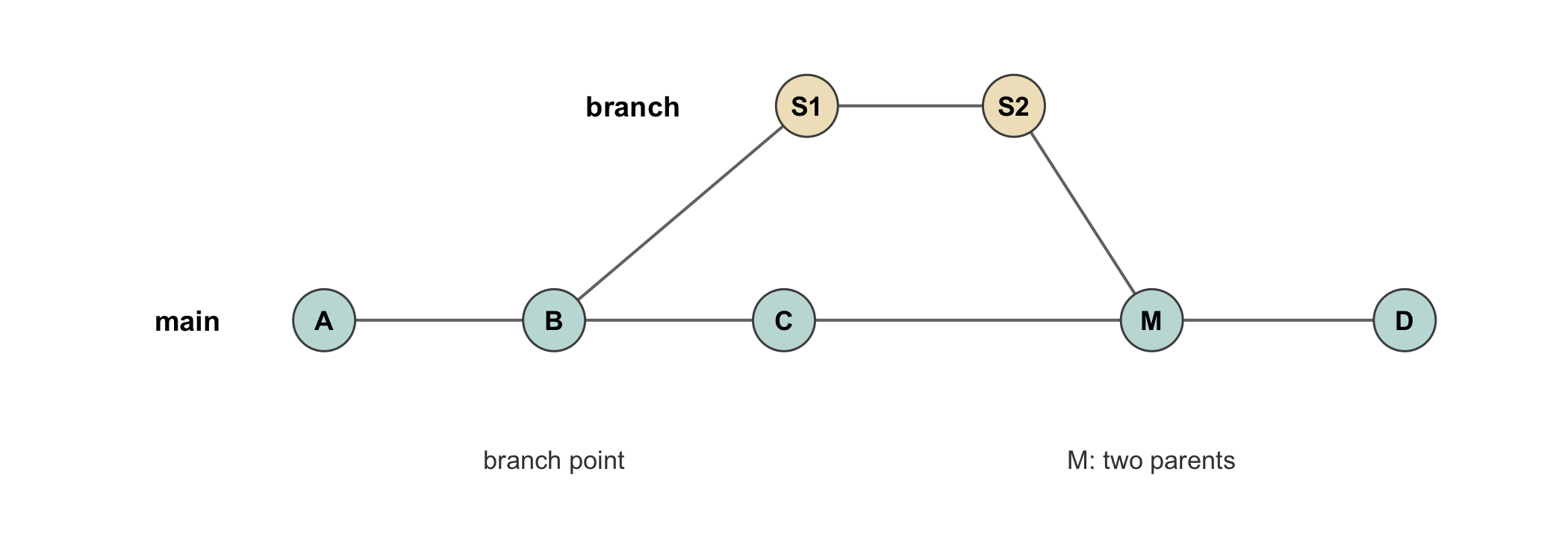
Figure 4.1 draws the shape. The point worth taking from it is that the branch does not copy the history: it names a new commit whose parent is a commit on main, and the merge names a commit with two parents. Everything before the branch point is shared, and no hash anywhere in the diagram changes when the branch is created or merged.
Figure 4.1: A branch and its merge, drawn as the commit graph git actually stores. The lower line is main; the upper line is a sensitivity-analysis branch created at commit B and merged back at M. Commits A through C exist once and are shared by both lines: the branch adds commits rather than copying them. The merge commit M is the only commit in the diagram with two parents, which is what records that the two lines rejoined and when.
4.9 The remote: GitHub, GitLab, and collaboration
Everything so far is local: the repository, its history, its branches all live in the .git directory on one machine, and if that machine is lost, so is the work. A remote is a copy of the repository hosted elsewhere, on GitHub, on GitLab, or on an institution’s own server, and connecting a local repository to a remote serves three distinct purposes that are worth separating.
The first is backup. A remote holds a complete copy of the history, so that a lost laptop costs at most the commits made since the last push. The second is distribution. A public remote is the mechanism by which a compendium becomes locatable to the world: a URL a reviewer can be given, a repository a reader can clone, the concrete form of the L0 rung of the ladder. The third is collaboration, the purpose that shapes the rest of this section.
The commands that connect to and synchronize with a remote are few. One names the remote once, then pushes local commits to it and pulls others’ commits from it.
# connect the local repo to a remote named origingit remote add origin https://github.com/lab/diabetes-cohort.git# push the main branch and remember the linkgit push -u origin main# later: send new local commits upgit push# and bring collaborators' commits downgit pull
For a team working across sites, a clinical trial with several participating centers, a multi-institution consortium, the dominant model on GitHub and GitLab is fork-and-pull-request (GitLab calls the latter a merge request, the same thing under another name). A contributor forks the canonical repository, making a personal copy on the remote, works on a branch of that fork, and then opens a pull request proposing that their branch be merged into the canonical repository. The pull request is a unit of review: the maintainers see exactly the diff being proposed, discuss it inline, request changes, and merge it only when satisfied. For a regulated multi-site analysis this is more than convenience. The pull request is a documented, attributable, reviewable gate through which every change to the shared analysis passes, and its record, who proposed what, who reviewed it, what was said, and when it was merged, is itself part of the audit trail, complementing the commit history with a record of the review of each change.
The last piece of the remote’s vocabulary is the pair tags and releases, and they matter to reproducibility specifically. A tag is a permanent, human-readable name for one commit: git tag -a v1.0-submission -m "State at journal submission" marks, forever and unambiguously, the exact state of the analysis at the moment a manuscript was submitted. A release on GitHub or GitLab is a tag dressed with notes and downloadable archives. The reproducibility payoff is that a reviewer, or the analyst a year later, can recover the precise state that produced the submitted numbers by naming the tag, rather than guessing which commit was current on the submission date. In Chapter 13 we shall see the same tagged state deposited to a public archive with a citable identifier; the tag is the local anchor to which that archival identity attaches.
NoteCheck your understanding: what does the pull request add?
A single analyst, working alone, keeps a clean commit history with careful messages. A reviewer asks why, if the history is already an audit trail, a multi-site trial should bother with the additional machinery of forks and pull requests. What does the pull request record that the commit history does not?
NoteAnswer
The commit history records what changed and, in its messages, why; it does not record who reviewed the change before it entered the shared analysis, or what they said. In a solo project there is no reviewer, so nothing is lost. In a multi-site trial, where a change to the shared analysis by one center affects every center’s results, the review is itself a controlled step, and the pull request is the artifact that records it: the proposed diff, the discussion, the requested changes, the approval, and the merge, each attributable and timestamped. The commit history answers ‘what was changed and why’; the pull request answers ‘who checked it, and did they agree’. For a regulated analysis both questions have auditors, and the two records together are stronger than either alone.
4.10 What git does not do
Having made version control the foundation, we must be exact about the boundary of what it provides, because the whole discipline of this book is matching a claim to what has actually been secured. Git versions text and tracks its history. It records, faithfully and tamper-evidently, every state of the files under it and the reason for each change. That is the entirety of what it does, and it is the L0 rung of the ladder: an analysis under version control is locatable, findable and readable by a second person, and no more.
In particular, git does not pin the package versions an analysis uses. A repository cloned a year later contains the same analysis.R, but running it installs whatever package versions are current, which may not be the versions the analyst used, so the code that ran may no longer run, or may run and return a different number. Git also does not pin the computational environment: the R version, the operating system, the system libraries a package links against are nowhere in the history, and a clone is at the mercy of whatever the next machine provides. These are exactly the layers of the determinant stack that Chapter 3 enumerated as unpinned at L0, and closing them is the work of the two chapters that follow: the lockfile of Chapter 6 pins the package layer to reach L1, and the container of Chapter 7 pins the environment layer to reach L2. Version control is necessary for all of this, since the lockfile and the Dockerfile are themselves files whose history git tracks, and sufficient for none of it. It puts the analysis on the ladder; it does not climb it.
ImportantThe honest level
Placing an analysis under version control and pushing it to GitHub achieves exactly L0, locatable, and a claim should say no more. A repository is not ‘reproducible’ because it is on GitHub; it is findable, which is the necessary first rung and not the summit. A methods section that writes ‘code is available at github.com/…’ has stated an L0 fact accurately, and should not dress it as an L1 or L2 claim. The honest sentence names the rung: ‘The analysis code is version-controlled and available at [URL]; package versions are pinned with renv (L1) and the environment with a container (L2)’ claims each rung only if the corresponding artifact is actually present. Version control is where the honesty of a reproducibility claim begins, because it is the rung every higher claim is built upon.
4.11 Worked example
To make the chapter concrete, we take the incident-diabetes cohort of the running example from an untracked folder to a tagged, remotely hosted repository, staying at the level of the commands and the judgment behind them. The shell sessions below are illustrative and are not executed.
The analyst begins with a folder of scripts and a registry extract, and the very first act, before a single commit, is to write the .gitignore, because the extract contains protected health information that must never enter the history.
cd diabetes-cohortgit init# write .gitignore FIRST, ignoring raw_data and credentialsgit status # confirm the extract is NOT listed as trackable
Only once git status confirms that the sensitive extract is ignored does the analyst make the first commit, the one that lifts the folder to L0, locatable.
git add .gitignore analysis/scripts/ DESCRIPTIONgit commit -m"Initialise compendium and .gitignore"
Work proceeds as a sequence of small, message-bearing commits: the cleaning script, the derived cohort table, the Cox model, each its own commit with its own reason, exactly the history tabulated in Table 4.1. When a reviewer later asks why the outlier threshold changed, the answer is one git log away.
To try a reviewer’s proposed reanalysis without disturbing the results already reported, the analyst branches.
git switch -c reviewer-sensitivity# ... reanalysis commits ...git switch main # main is untouched and still runs
The work is backed up and made locatable by connecting a remote and pushing.
git remote add origin https://github.com/lab/diabetes-cohort.gitgit push -u origin main
A collaborator at a second site forks the repository, adds a site-specific adjustment on a branch of their fork, and opens a pull request. The analyst reviews the diff inline, requests one change, and merges it, leaving a reviewable record of the exchange. Finally, at journal submission, the analyst marks the exact state.
git tag -a v1.0-submission -m"State at journal submission"git push origin v1.0-submission
The folder is now a version-controlled, remotely hosted, tagged repository: firmly at L0, with a clean audit trail, a reviewed collaboration record, and a permanent anchor to the submitted state. It is not yet L1 or L2, because nothing has pinned the packages or the environment, and the honest reproducibility statement says exactly that. The lockfile of Chapter 6 is the next commit.
4.12 Collaborating with an LLM
A language model is a fluent assistant for git, which is a domain rich in memorized command recipes, and precisely that fluency is the hazard: the model will confidently produce a command that does what was asked and more, including irreversible operations, and it cannot see the sensitivity of your files. The three triples below mark the division of labor.
Prompt. ‘I accidentally committed a file of patient data three commits ago. Give me the git commands to remove it.’
Watch for. The model will supply a history-rewriting recipe (git filter-repo, or the older filter-branch, or a reset) and present it as a clean fix. It cannot know whether the offending commit was ever pushed to a remote, which is the fact that determines whether removal is even possible, and it will not, on its own, raise the breach question.
Verification. Treat the exposure, not the git command, as the primary problem. Establish first whether the commit was pushed; if it was, assume the data has been cloned and cached and follow your institution’s incident procedure, because no git command can recall it. Only then, and for a purely local history, apply a rewriting tool, verifying on a copy of the repository first. The model’s recipe addresses the mechanics and is blind to the obligation.
Prompt. ‘Write a .gitignore for my R health-data analysis project.’
Watch for. A generic R .gitignore (the standard .Rhistory, .RData, .Rproj.user/ list) that omits the one category that matters most, the raw data and credentials specific to your project, because the model cannot see your directory and does not know where your PHI lives.
Verification. Take the generic list as a starting point, then add, by hand, the explicit paths of every raw-data directory, every .Renviron or credential file, and every restricted dataset, and confirm with git status that each is untracked before the first commit. The generic patterns are safe to accept; the project-specific sensitive paths are yours to supply.
Prompt. ‘Write good commit messages for these changes.’
Watch for. Messages that fluently describe what changed, which the model can read from the diff, but invent or omit the why, which is the scientifically load-bearing part and which the model cannot know. A plausible-sounding ‘Update outlier threshold’ hides the reviewer request that a real audit trail must record.
Verification. Supply the reason yourself. Let the model draft the imperative summary line from the diff, then edit in the motivation, the reviewer comment, the corrected denominator, the protocol amendment, that turns a description into an accountable record. The model can summarize the change; only the analyst knows why it was made.
4.13 Exercises
Take a folder of your own currently versioned by the FINAL-file method, count the manual snapshot files it contains, and for two of them state what changed between them and why. Note which of those two questions you can still answer, and use the difficulty as a measure of what a commit history would have preserved.
Initialize a git repository in a scratch directory, make three commits that each change one file, and then use git log --oneline and git show to recover, for the middle commit, both what changed and the message you wrote. Confirm that the commit hashes are unchanged by a later commit.
Write a .gitignore for a data-analysis compendium and a second for an R-package compendium, and list the patterns that appear in one but not the other. Explain each difference in terms of what the archetype produces.
Explain, to a colleague who has just deleted a PHI-containing file in a new commit and believes the problem solved, why the file is still in the history, what determines whether it can be removed, and what to do if the offending commit was already pushed to GitHub.
Construct the sequence of commands by which a collaborator at a second trial site would contribute a change through a fork and a pull request, and state, for each step, what part of the audit trail it records that a direct push to main would not.
An analyst pushes a version-controlled compendium to GitHub and writes in the methods section that the analysis is ‘fully reproducible’. State the rung the analysis has actually reached, name the two layers of the determinant stack that remain unpinned, and rewrite the sentence so that it claims exactly what version control secures and no more.
4.14 Solutions
Attempt an exercise before expanding its solution. The first two ask the reader to work in their own directories, so what they produce will vary; the boxes say what a good answer establishes.
NoteExercise 1
No single correct answer. What a good answer establishes is the asymmetry between the two questions, because the asymmetry is the argument for version control.
Almost every reader can answer what changed between two snapshot files, because the files are still there and a diff tool will show it. Almost no reader can answer why, because the reason was never written down anywhere. It lived in the analyst’s head, or in an email, or in a conversation after a meeting, and it is gone. Readers commonly find they can reconstruct the what for files a year old and cannot reconstruct the why for files a month old.
That gap is precisely what a commit history preserves. The diff is recoverable from the files themselves, so it is the cheaper half; the message is not recoverable from anything, so it is the half that decays. This is why the chapter insists that a commit is an atomic unit of one idea with a message attached: the message is the only part of the record that cannot be reconstructed later.
A reader who finds that they can answer why, because they named the files carefully, has demonstrated the FINAL method working at its best, and should notice how much of the reasoning fits in a filename.
NoteExercise 2
The mechanics are straightforward, so the substance is the last clause.
git init# edit file_a.txtgit add file_a.txt &&git commit -m'Add the cohort filter'# edit file_b.txtgit add file_b.txt &&git commit -m'Raise the outlier threshold'# edit file_c.txtgit add file_c.txt &&git commit -m'Add the summary table'git log --onelinegit show <middle-hash>
git log --oneline lists the three commits newest first, each with an abbreviated hash and its subject line. git show on the middle hash prints both halves of the record: the message you wrote, and the diff of what changed.
On the hashes: recording the middle commit’s hash before making the third commit and comparing afterward shows it unchanged. This is worth dwelling on. A commit hash is computed over the commit’s content and its parent’s hash, so it fixes the entire history leading to it. Adding a commit on top cannot alter it, because the new commit points backward and nothing points forward. That is the property that makes the history an audit trail rather than a mutable log.
The honest qualification, which a careful reader may raise: hashes are stable under adding history, not under rewriting it. An amend or a rebase produces new commits with new hashes, and the old ones become unreferenced. The audit-trail property holds for a history that is appended to, which is why rewriting shared history is treated as a serious act.
NoteExercise 3
The two files share most of their content and differ in a way that follows from what each archetype produces.
Common to both: .Rproj.user/, .Rhistory, .RData, .DS_Store, and renv/library/, which is a local install tree reconstructable from the lockfile and must never be committed.
In the data-analysis file but not the package one: patterns for rendered outputs, *.html and *.pdf, since the report is a product the code regenerates; the derived data directory, or selected paths within it; and, most importantly, the raw-data extract if it carries protected information.
In the R-package file but not the analysis one: inst/doc/, which holds built vignettes, and src/*.o and src/*.so, the compiled object files, which exist only if the package carries compiled code and are rebuilt on every install.
The explanation to give for each difference is the same shape: an archetype ignores what it generates and commits what it is. A data-analysis compendium generates a report and so ignores it. A package generates compiled objects and built vignettes and so ignores those. Neither ignores its own source.
The one line that is not a matter of archetype is the data carrying protected health information, which is ignored in every archetype, always, and is the subject of the next exercise.
NoteExercise 4
The colleague’s mental model is that a repository holds the current state of the files. It holds their whole history, and that is the point of it.
Why the file is still there. Deleting a file in a new commit records the deletion as a change; the commit that added the file is untouched, and the file’s contents are retrievable from it by anyone who clones the repository. The deletion is a new fact appended to the record, not an erasure of the old one.
What determines whether it can be removed. Whether the history has been shared. Removing content means rewriting every commit from the offending one forward, with git filter-repo or an equivalent, which produces new hashes for all of them. If the offending commit exists only in the local repository, this is a local operation and costs nothing but care. If it has been pushed, every clone and fork holds the old objects, and rewriting the local copy does not touch them.
What to do if it was already pushed to GitHub. Treat the data as disclosed and act in that order. Notify whoever is responsible for the data, an IRB or a privacy office, because a disclosure has occurred and the notification obligation is not a technical question. Rotate anything rotatable. Then rewrite the history and force-push, ask GitHub Support to purge cached views and any dangling objects, and require every collaborator to re-clone rather than pull, since a pull onto a rewritten history reintroduces the old objects. Note the ordering: the cleanup is the last step and the least important one, because it does not undo the exposure.
The lesson the chapter draws is that this is why the .gitignore for protected data is written before the first commit rather than after the first mistake.
NoteExercise 5
A serviceable sequence, with the audit contribution of each step.
# 1. Fork the canonical repository on the forge.git clone https://github.com/<site2>/<study>.gitcd<study>git remote add upstream https://github.com/<coord>/<study>.git# 2. Branch from an up-to-date main.git fetch upstream &&git checkout -b fix/outlier-threshold upstream/main# 3. Commit the change.git add R/clean_cohort.Rgit commit -m'Raise outlier threshold to 4 SD per DSMB request'# 4. Push to the fork and open a pull request.git push origin fix/outlier-threshold
What each step records that a direct push would not. The fork establishes that the contributor did not hold write access to the canonical analysis, so the change could not enter without someone else’s action. The branch separates the proposal from the accepted state, so the history of main contains only what was agreed. The commit is the same in either workflow and records what and why. The pull request is the artifact that carries everything a direct push destroys: the proposed diff before it was accepted, the discussion, any requested changes and the revisions answering them, the identity of the approver, and the timestamp of the approval. The merge records that the approval preceded the entry into main.
The compressed version of the answer: the commit history answers ‘what changed and why’; the pull request answers ‘who checked it, and did they agree’. A direct push to main answers only the first, and in a multi-site trial the second question has auditors too.
NoteExercise 6
The rung reached is L0. Version control makes the analysis locatable and gives it a history. It pins the analysis code, which is a real achievement and the precondition for everything above it, but the ladder grades how far down the determinant stack a result is locked, and the code sits at the top of that stack.
Two layers that remain unpinned. The package versions, since nothing in a git repository records which version of dplyr produced the numbers; and the environment beneath them, the R runtime, the operating system, and the system libraries. A reader may equally name the numerical libraries or the session configuration and be right; the point is to name layers the repository does not touch. The common wrong answer is to name the data, which version control can pin for a small committed dataset, though usually does not for a large or protected one.
A rewritten sentence. ‘The analysis code is version controlled and deposited at [location], so the exact code that produced these results can be retrieved. The software environment was not recorded; re-execution may therefore require package versions differing from those used here, and we have not verified that the results regenerate.’
The three clauses map onto the three claims: what is secured, what is not, and what has not been checked. The last clause is the one authors most often omit, and it is the difference between claiming L0 honestly and claiming L3 by implication.
4.15 Further reading
Ram (2013) is the direct argument for git as an instrument of reproducibility and transparency in science, and is the natural first reading for a researcher who has met git only as a software tool; it makes the case for the commit history as a record of scientific provenance.
Bryan (2018) is the standard orientation to version control written for data scientists rather than software engineers, and it motivates GitHub as the collaboration substrate with the working analyst’s concerns foremost; her longer online work Happy Git and GitHub for the useR is the companion practical manual.
Wilson et al. (2017) and Sandve et al. (2013) place version control among the good practices of reproducible computational research, the former as one of a set of habits for scientific computing and the latter among its rules for reproducible analysis; read them to see version control situated alongside the other pillars this book develops.
The layers that version control does not pin are the subject of Chapter 6 and Chapter 7, and the continuous integration and collaboration built upon a git history are developed in Chapter 12 and Chapter 13; this chapter is best read as the foundation those four presuppose.
Ram, K. (2013). Git can facilitate greater reproducibility and increased transparency in science. Source Code for Biology and Medicine, 8(1), 7. https://doi.org/10.1186/1751-0473-8-7
Sandve, G. K., Nekrutenko, A., Taylor, J., & Hovig, E. (2013). Ten simple rules for reproducible computational research. PLOS Computational Biology, 9(10), e1003285. https://doi.org/10.1371/journal.pcbi.1003285
Wilson, G., Bryan, J., Cranston, K., Kitzes, J., Nederbragt, L., & Teal, T. K. (2017). Good enough practices in scientific computing. PLOS Computational Biology, 13(6), e1005510. https://doi.org/10.1371/journal.pcbi.1005510